4 integers are enough to write a Snake Game
… actually you can use only 2, but this will make your life a little more miserable.
Introduction
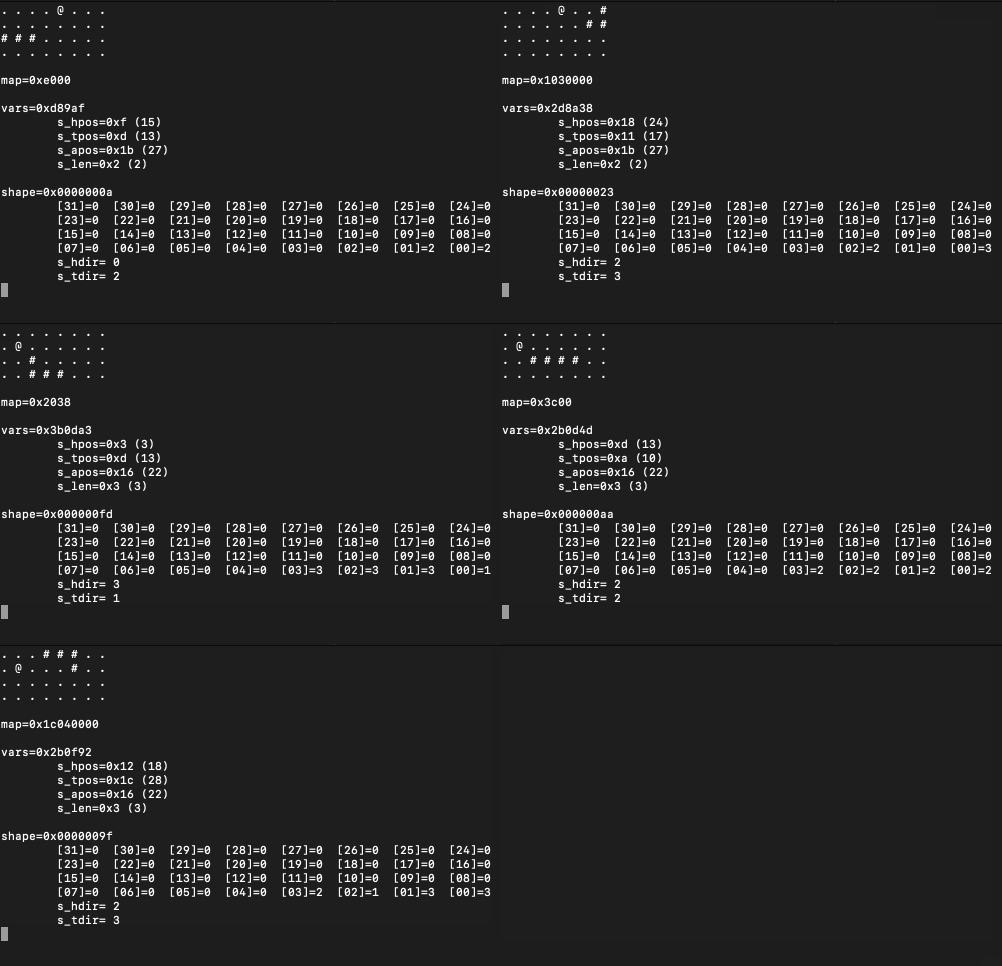
After not implementing a game of Snake in ages, I decided to do my best today, but with some strange and absurd limitations in mind, you know, to spice things up:
- We will store the game map in a
uint32_twhere1s will form the reptile’s body. The map will contain4x8positions. Enough to have fun! - We will keep another
uint64_tas a directions array - this will be useful to move the snake around while keeping its growing shape intact. - We will squeeze a few more 5-bit values into an
uint32_tto keep the positions of thehead, thetail, theapple, and the (current)length. Any input from the keyboard will also be kept here (2 bits will be enough). - We will keep an 8-bit (
uint8_t) variable for looping.
Because there’s no standard C-way of interacting with the keyboard, I will have to rely on curses, so if you want to compile the program, make sure you have the library installed on your system. If you’re using the right type of operating system (Linux/macOS), chances are it’s already there. If not, you can certainly install it via your favorite package manager.
Unfortunately, curses uses additional memory by itself, but let’s be honest, hacking with arcane escape chars and low-level system functions is not fun, and certainly not something I am willing to try by myself right now. Yes, it’s cheating, and this article is a fraud!
Before you continue reading (if you haven’t stopped by now), note that the code should be taken as a twisted joke, as an exercise in minimalism, or as both, but probably mostly a joke. Because of the aforementioned limitations, we are going to write some nasty macros to perform bitwise operations, use global variables, reuse the same counter, etc. This is not a good example of readable or elegant code.
The code
Everything is available on GitHub:
git clone git@github.com:nomemory/integers-snake.git
To compile and run the program:
gcc -Wall snake.c -lcurses && ./a.out
The memory layout
We will start by defining the 4 integers that will hold all our game data:
uint32_t map = ...;
uint32_t vars = ...;
uint64_t shape = ...;
int8_t i = ...;
map
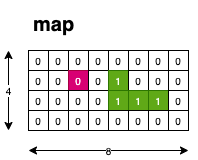
map is what we are going to display on the screen. The 32 bits of map will form a 4x8 grid that will be rendered using curses:
To access the memory and set bits to zero or one, we can use the following macros:
#define s_is_set(b) ((map & (1 << (b))) != 0) // checks if the b bit from the map is set to 1
#define s_tog(b) (map ^= (1 << (b))) // toggles the b bit of the map (currently not used)
#define s_set_0(b) (map &= ~(1 << (b))) // sets to 0 the b bit from the map
#define s_set_1(b) (map |= (1 << (b))) // sets to 1 the b bit from the map
vars
vars is a 32-bit integer where we will keep the following data:
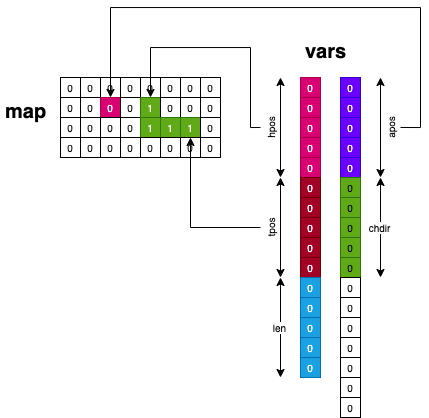
hpos(from bit0to4) represents the head position of the snake as an offset from the map’s LSB;tpos(from bit5to9) represents the tail position of the snake as an offset from the map’s LSB;len(from bit10to14) represents the length of the snake;apos(from bit15to19) represents the apple position as an offset from the map’s LSB;chdir(from bit20to21) represents the last key pressed.2bits are enough because only arrows are registered, and there are 4 of them;- the remaining bits are not used. Normally we could have kept the
uint8_tcounter here, but for simplicity, I chose to use a separate variable.
To access hpos, tpos, etc., we have defined the following macros. Each of them works like a getter/setter for the corresponding segments:
#define s_mask(start, len) (s_ls_bits(len) << (start)) // creates a bitmask of len starting from position start
#define s_prep(y, start, len) (((y) & s_ls_bits(len)) << (start)) // prepares the mask

// Gets the 'len' number of bits, starting from position 'start' of 'y'
#define s_get(y, start, len) (((y) >> (start)) & s_ls_bits(len))
// Sets the 'len' number of bits, starting from position 'start' of 'x' to the value 'bf'
#define s_set(x, bf, start, len) (x = ((x) & ~s_mask(start, len)) | s_prep(bf, start, len))

#define s_hpos s_get(vars, 0, 5) // gets the first 5 bits of 'vars', which corresponds to s_hpos
#define s_tpos s_get(vars, 5, 5) // gets the next 5 bits of 'vars', which corresponds to s_tpos
#define s_len s_get(vars, 10, 5)
#define s_apos s_get(vars, 15, 5)
#define s_chdir s_get(vars, 20, 2)

#define s_hpos_set(pos) s_set(vars, pos, 0, 5)
#define s_tpos_set(pos) s_set(vars, pos, 5, 5)
#define s_len_set(len) s_set(vars, len, 10, 5)
#define s_apos_set(app) s_set(vars, app, 15, 5)
#define s_chdir_set(cdir) s_set(vars, cdir, 20, 2)
#define s_len_inc s_len_set(s_len + 1)
For more information describing the technique behind these macros, please read the following article: Working with bits and bitfields.
shape
shape keeps the directions for each cell of the snake’s body. 2 bits per direction are enough, so we can keep a total of 32 directions in a 64-bit integer:
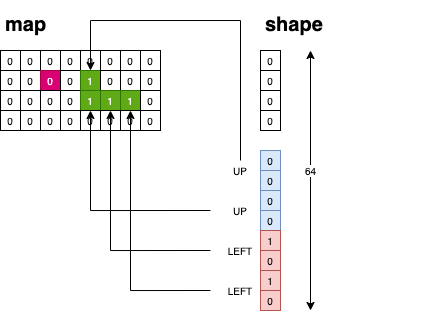
The possible directions are mapped using the following macros:
#define SU 0 // UP
#define SD 1 // DOWN
#define SL 2 // LEFT
#define SR 3 // RIGHT
Each time the snake moves inside the map grid, we cycle through the directions with the following macros:
#define s_hdir ((shape >> (s_len * 2) & 3)) // retrieves the head direction (based on s_len)
#define s_tdir (shape & 3) // retrieves the last 2 bits which corresponds to the tail
#define s_hdir_set(d) s_set(shape, d, s_len * 2, 2) // sets the head direction
#define s_tdir_set(d) s_set(shape, d, 0, 2) // sets the tail direction

// Macros for changing the shape each time the snake moves
#define s_shape_rot(nd) do { shape >>= 2; s_hdir_set(nd); } while(0);
#define s_shape_add(nd) do { s_len_inc; shape <<= 2; s_tdir_set(nd); } while(0);
When the snake moves without eating an apple, we call the s_shape_rot macro, which removes the last direction (tail) and pushes a new head direction (based on s_chdir).
In this regard, shape behaves exactly like a queue:
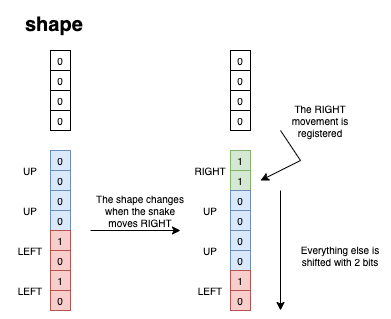
When the snake moves and eats an apple, we call s_shape_add, which increases the length and pushes a new tail direction s_tdir.
The game loop
The game loop looks like this:
// Some macros to make the code more readable
// (or unreadable, depending on you)
#define s_init do { srand(time(0)); initscr(); keypad(stdscr, TRUE); cbreak(); noecho(); } while(0);
#define s_exit(e) do { endwin(); exit(e); } while(0);
#define s_key_press(k1, k2) if (s_hdir == k2) break; s_chdir_set(k1); break;

int main(void) {
    s_init; // initialize the curses context
    rnd_apple(); // creates a random position for the apple
    while(1) {
        show_map(); // renders the map on screen
        timeout(80); // getch() timeouts after waiting for user input
        switch (getch()) {
            case KEY_UP : { s_key_press(SU, SD) };
            case KEY_DOWN : { s_key_press(SD, SU) };
            case KEY_LEFT : { s_key_press(SL, SR) };
            case KEY_RIGHT : { s_key_press(SR, SL) };
            case 'q' : s_exit(0); // Quits the game
        }
        move_snake(); // The snake moves inside the grid
        s_shape_rot(s_chdir); // The shape is updated
        napms(200); // frame rate :))
    }
    s_exit(0); // game exits (though unreachable due to while(1))
}
Each time an arrow key is pressed, s_key_press is expanded. This checks if the movement is possible, and then updates s_chdir (using s_chdir_set).
The reason s_key_press requires two input parameters is to exclude the opposite direction. For example, if the snake is currently moving to the RIGHT (SR), moving LEFT (SL) is not physically possible, and thus we break out of the switch without updating the direction.
The function that moves the snake:
move_snake() is where most of our game logic is implemented:
#define s_next_l s_mask5(s_hpos + 1) // incrementing the offset to go right
#define s_next_r s_mask5(s_hpos - 1) // decrementing the offset to go left
#define s_next_u s_mask5(s_hpos + 8) // change row up, by adding 8 positions to the offset
#define s_next_d s_mask5(s_hpos - 8) // change row down, by removing 8 positions from the offset

// Check if a left movement is possible.
static void check_l() { if ((s_mod_p2(s_next_l, 8) < s_mod_p2(s_hpos, 8)) || s_is_set(s_next_l)) s_exit(-1); }
// Check if a right movement is possible.
static void check_r() { if ((s_mod_p2(s_next_r, 8) > s_mod_p2(s_hpos, 8)) || s_is_set(s_next_r)) s_exit(-1); }
// Check if an up movement is possible
static void check_u() { if ((s_next_u < s_hpos) || s_is_set(s_next_u)) s_exit(-1); }
// Check if a down movement is possible
static void check_d() { if ((s_next_d > s_hpos) || s_is_set(s_next_d)) s_exit(-1); }

static void move_snake() {
    if (s_hdir == SL) { check_l(); s_hpos_set(s_hpos + 1); }
    else if (s_hdir == SR) { check_r(); s_hpos_set(s_hpos - 1); }
    else if (s_hdir == SU) { check_u(); s_hpos_set(s_hpos + 8); }
    else if (s_hdir == SD) { check_d(); s_hpos_set(s_hpos - 8); }

    // Sets the bit based on the current s_hdir and s_hpos
    s_set_1(s_hpos);

    // If an apple is eaten
    if (s_apos == s_hpos) {
        // We generate another apple so we don't starve
        rnd_apple();
        // Append to the tail
        s_shape_add(s_tdir);
        // We stop clearing the tail bit
        return;
    }

    // Clear the tail bit
    s_set_0(s_tpos);

    // Update the t_pos so we can clear the next tail bit when the snake moves
    if (s_tdir == SL) { s_tpos_set(s_tpos + 1); }
    else if (s_tdir == SR) { s_tpos_set(s_tpos - 1); }
    else if (s_tdir == SU) { s_tpos_set(s_tpos + 8); }
    else if (s_tdir == SD) { s_tpos_set(s_tpos - 8); }
}
To validate whether the snake can move within the grid, we implemented the check_*() functions:
check_l()- we check if the X coordinate of the snake (the modulo%8ofs_hpos) is larger than the one from the previous position.check_r()- we check if the X coordinate of the snake (the modulo%8ofs_hpos) is smaller than the one from the previous position.check_u()andcheck_d()work similarly; they check if incrementing/decrementings_hposcauses it to overflow/underflow. If it does, it means we have exited the bounds of the grid. Here, integer overflows are used as features.
The function that displays the snake
This is the last function we are going to implement:
static void show_map() {
    clear();
    i = 32;
    while(i-- > 0) { // !! Trigger warning for sensitive people: incoming '-->0' slide operator
        // If the bit is an apple, we render the apple '@'
        if (i == s_apos) { addch('@'); addch(' '); }
        // We draw either the snake bit ('#') or the empty bit ('.')
        else { addch(s_is_set(i) ? '#' : '.'); addch(' '); }
        // We construct the grid by inserting a new line every 8 characters
        if (!s_mod_p2(i, 8)) { addch('\n'); }
    };
}
After the macros expand
After all the macros expand, the resulting C code looks like this:
uint32_t map = 0x700;
uint32_t vars = 0x20090a;
uint64_t shape = 0x2a;
int8_t i = 0;
static void rnd_apple() {
    i = (rand() & (32 - 1));
    while(((map & (1 << (i))) != 0)) i = (rand() & (32 - 1));
    (vars = ((vars) & ~(((1 << (5)) - 1) << (15))) | (((i) & ((1 << (5)) - 1)) << (15)));
}
static void show_map() {
    wclear(stdscr);
    i = 32;
    while(i-- > 0) {
        if (i == (((vars) >> (15)) & ((1 << (5)) - 1))) { waddch(stdscr, '@'); waddch(stdscr, ' '); }
        else { waddch(stdscr, ((map & (1 << (i))) != 0) ? '#' : '.'); waddch(stdscr, ' '); }
        if (!(i & (8 - 1))) { waddch(stdscr, '\n'); }
    };
}
static void check_l() { if ((((((((vars) >> (0)) & ((1 << (5)) - 1)) + 1) & 0x1f) & (8 - 1)) < ((((vars) >> (0)) & ((1 << (5)) - 1)) & (8 - 1))) || ((map & (1 << ((((((vars) >> (0)) & ((1 << (5)) - 1)) + 1) & 0x1f)))) != 0)) do { endwin(); exit(-1); } while(0);; }
static void check_r() { if ((((((((vars) >> (0)) & ((1 << (5)) - 1)) - 1) & 0x1f) & (8 - 1)) > ((((vars) >> (0)) & ((1 << (5)) - 1)) & (8 - 1))) || ((map & (1 << ((((((vars) >> (0)) & ((1 << (5)) - 1)) - 1) & 0x1f)))) != 0)) do { endwin(); exit(-1); } while(0);; }
static void check_u() { if (((((((vars) >> (0)) & ((1 << (5)) - 1)) + 8) & 0x1f) < (((vars) >> (0)) & ((1 << (5)) - 1))) || ((map & (1 << ((((((vars) >> (0)) & ((1 << (5)) - 1)) + 8) & 0x1f)))) != 0)) do { endwin(); exit(-1); } while(0);; }
static void check_d() { if (((((((vars) >> (0)) & ((1 << (5)) - 1)) - 8) & 0x1f) > (((vars) >> (0)) & ((1 << (5)) - 1))) || ((map & (1 << ((((((vars) >> (0)) & ((1 << (5)) - 1)) - 8) & 0x1f)))) != 0)) do { endwin(); exit(-1); } while(0);; }
static void move_snake() {
    if (((shape >> ((((vars) >> (10)) & ((1 << (5)) - 1)) * 2) & 3)) == 2) { check_l(); (vars = ((vars) & ~(((1 << (5)) - 1) << (0))) | ((((((vars) >> (0)) & ((1 << (5)) - 1)) + 1) & ((1 << (5)) - 1)) << (0))); }
    else if (((shape >> ((((vars) >> (10)) & ((1 << (5)) - 1)) * 2) & 3)) == 3) { check_r(); (vars = ((vars) & ~(((1 << (5)) - 1) << (0))) | ((((((vars) >> (0)) & ((1 << (5)) - 1)) - 1) & ((1 << (5)) - 1)) << (0))); }
    else if (((shape >> ((((vars) >> (10)) & ((1 << (5)) - 1)) * 2) & 3)) == 0) { check_u(); (vars = ((vars) & ~(((1 << (5)) - 1) << (0))) | ((((((vars) >> (0)) & ((1 << (5)) - 1)) + 8) & ((1 << (5)) - 1)) << (0))); }
    else if (((shape >> ((((vars) >> (10)) & ((1 << (5)) - 1)) * 2) & 3)) == 1) { check_d(); (vars = ((vars) & ~(((1 << (5)) - 1) << (0))) | ((((((vars) >> (0)) & ((1 << (5)) - 1)) - 8) & ((1 << (5)) - 1)) << (0))); }
    (map |= (1 << (((vars) >> (0)) & ((1 << (5)) - 1))));
    if ((((vars) >> (15)) & ((1 << (5)) - 1)) == (((vars) >> (0)) & ((1 << (5)) - 1))) {
        rnd_apple();
        do { (vars = ((vars) & ~(((1 << (5)) - 1) << (10))) | ((((((vars) >> (10)) & ((1 << (5)) - 1)) + 1) & ((1 << (5)) - 1)) << (10))); shape <<= 2; (shape = ((shape) & ~(((1 << (2)) - 1) << (0))) | ((((shape & 3)) & ((1 << (2)) - 1)) << (0))); } while(0);;
        return;
    }
    (map &= ~(1 << (((vars) >> (5)) & ((1 << (5)) - 1))));
    if ((shape & 3) == 2) { (vars = ((vars) & ~(((1 << (5)) - 1) << (5))) | ((((((vars) >> (5)) & ((1 << (5)) - 1)) + 1) & ((1 << (5)) - 1)) << (5))); }
    else if ((shape & 3) == 3) { (vars = ((vars) & ~(((1 << (5)) - 1) << (5))) | ((((((vars) >> (5)) & ((1 << (5)) - 1)) - 1) & ((1 << (5)) - 1)) << (5))); }
    else if ((shape & 3) == 0) { (vars = ((vars) & ~(((1 << (5)) - 1) << (5))) | ((((((vars) >> (5)) & ((1 << (5)) - 1)) + 8) & ((1 << (5)) - 1)) << (5))); }
    else if ((shape & 3) == 1) { (vars = ((vars) & ~(((1 << (5)) - 1) << (5))) | ((((((vars) >> (5)) & ((1 << (5)) - 1)) - 8) & ((1 << (5)) - 1)) << (5))); }
}

int main(void) {
    do { srand(time(0)); initscr(); keypad(stdscr, 1); cbreak(); noecho(); } while(0);;
    rnd_apple();
    while(1) {
        show_map();
        wtimeout(stdscr, 80);
        switch (wgetch(stdscr)) {
            case 0403 : { if (((shape >> ((((vars) >> (10)) & ((1 << (5)) - 1)) * 2) & 3)) == 1) break; (vars = ((vars) & ~(((1 << (2)) - 1) << (20))) | (((0) & ((1 << (2)) - 1)) << (20))); break; };
            case 0402 : { if (((shape >> ((((vars) >> (10)) & ((1 << (5)) - 1)) * 2) & 3)) == 0) break; (vars = ((vars) & ~(((1 << (2)) - 1) << (20))) | (((1) & ((1 << (2)) - 1)) << (20))); break; };
            case 0404 : { if (((shape >> ((((vars) >> (10)) & ((1 << (5)) - 1)) * 2) & 3)) == 3) break; (vars = ((vars) & ~(((1 << (2)) - 1) << (20))) | (((2) & ((1 << (2)) - 1)) << (20))); break; };
            case 0405 : { if (((shape >> ((((vars) >> (10)) & ((1 << (5)) - 1)) * 2) & 3)) == 2) break; (vars = ((vars) & ~(((1 << (2)) - 1) << (20))) | (((3) & ((1 << (2)) - 1)) << (20))); break; };
            case 'q' : exit(0);
        }
        move_snake();
        do { shape >>= 2; (shape = ((shape) & ~(((1 << (2)) - 1) << ((((vars) >> (10)) & ((1 << (5)) - 1)) * 2))) | ((((((vars) >> (20)) & ((1 << (2)) - 1))) & ((1 << (2)) - 1)) << ((((vars) >> (10)) & ((1 << (5)) - 1)) * 2))); } while(0);;
        napms(200);
    }
    do { endwin(); exit(0); } while(0);;
}
It’s not a beautiful sight, but it looks mesmerizing. When I scroll through the code, I get motion bitwise sickness.
Final thoughts
It was a fun exercise. The full code can be found here; it’s around 100 lines and just 4 integers.
If the snake moves too fast on your terminal, you can tweak the speed by increasing napms(200);.
Source Code & Contributions
Spot an error or have an improvement? Open a PR directly for this article .