Demystifying bitwise operations, a gentle C tutorial
Introduction
Bitwise operations are a fundamental part of Computer Science. They help software engineers gain a deeper understanding of how computers represent and manipulate data, and they are crucial when writing performance-critical code.
Truth be told, they are rarely used in the everyday business code we write; instead, they stay hidden in libraries, frameworks, or low-level system programming codebases.
The reason is simple: writing code that operates on bits can be tedious, less readable, not always portable, and, most importantly, error-prone (!). Modern programming languages offer higher-level abstractions that replace the need for bitwise operations and constructs, and trading small (potential) performance and memory gains for readability is usually a good deal. Plus, compilers are much smarter today and can optimise your code in ways you (and I) cannot even imagine.
To illustrate my point, not so long ago, I wrote a Snake game in C that uses only bitwise operations and squeezes everything into just a handful of uint32_t and uint64_t variables. The results (after macro expansions) are not that readable, even to the trained eye.

In any case, this article is not about why we shouldn’t ever touch them. On the contrary, it is about why they are cool and how they can make specific code snippets orders of magnitude faster than the “higher-level, readable, modern” approach. If you are a programmer who enjoys competitive programming, knowing bitwise operations (in case you don’t already) will help you write much more efficient code.
Furthermore, knowing how to work with bitwise operations is strictly necessary if you plan a career in systems programming, network programming, or embedded software development.
Number systems
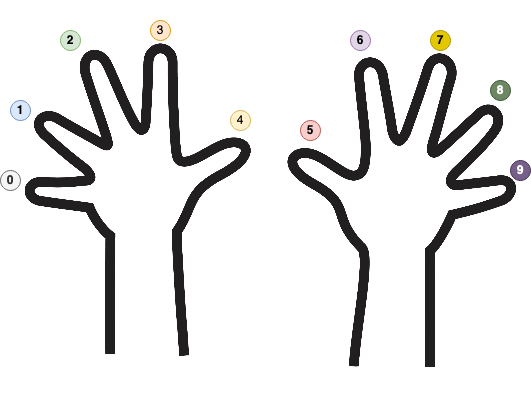
Nature gifted humankind ten fingers. As a direct consequence of Nature’s decision, our math (and numbers) is almost always expressed in base 10. If an alien species (with eight fingers) discovers mathematics, they will probably use base 8 (octal) to represent their numbers. Meanwhile, computers love base 2 (binary) because computers only have two fingers: 1 and 0, or one and none.
The Mayan numeral system was the system used to represent numbers and calendar dates in the Maya civilization. It was a vigesimal (base-20) positional numeral system.
In mathematics, a base refers to the number of distinct symbols we use to represent and store numbers.
In our case (decimal), those symbols are 0, 1, 2, 3, 4, 5, 6, 7, 8, and 9. We must “recombine” the existing symbols to express larger numbers. For example, 127 is defined by re-using 1, 2, and 7. The three symbols are combined to express a greater quantity that cannot be described using mere fingers.
By far, the most popular number system bases are:
| Number System | Base | Symbols |
|---|---|---|
| Binary | 2 | [0, 1] |
| Octal | 8 | [0, 1, 2, 3, 4, 5, 6, 7] |
| Decimal | 10 | [0, 1, 2, 3, 4, 5, 6, 7, 8, 9] |
| Hexadecimal | 16 | [0, 1, 2, 3, 4, 5, 6, 7, 8, 9, A, B, C, D, E, F] |
To make things more generic, if $b$ is the base, to write the natural number $a$ in base $b$ (notation is $a_{b}$), the formula is:
For example, 1078 in base 10 ($b=10$, so $a_{i} \in {0,1,2,3,4,5,6,7,8,9}$) can be written as:
If we were to change the base and write 1078 from base 10 to base 7, then $b=7$ and $a_{i} \in {0,1,2,3,4,5,6}$ (imagine we only have seven fingers numbered from 0 to 6):
If we are to change the base and write 1078 from base 10 to base 2, then $b=2$ and $a_{i} \in {0,1}$:
As we’ve said earlier, computers store numbers in binary. To better visualise what our memory looks like, let’s take a look at the following diagram:
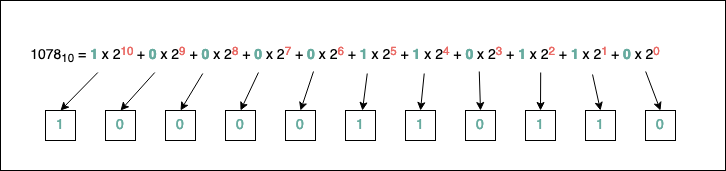
As you can see, to identify the bits (the sequence of zeroes and ones, which are the acceptable symbols in binary) comprising the number, we have to find an algorithm to determine the numbers $a_{i}$. Luckily, such an algorithm exists, and it’s straightforward to implement. It works the same no matter what base we pick.
Based on the above picture, another important observation is that to represent the number 1078 in binary, we need at least ten memory cells (bits) for it (look at the most significant power of 2 used, which is 10). As a side rule, the fewer symbols we have for our base, the more we have to repeat existing symbols. If we want to go to the extreme and pick b=1, we will have a Unary Numeral System, where representing a number N is equivalent to repeating the unique symbol of the system N times.
The algorithm for transitioning a number to any base $b$ is as follows:
- We convert the number to the decimal base;
- We divide the decimal representation of the number by the base $b$;
- We record the remainder of the division (this will be a digit in the base $b$ representation);
- We continue dividing the quotient by base $b$ and keep recording the remainder;
- If the quotient becomes
0at some point, we stop.
The base $b$ representation of the decimal number will be the sequence of remainders (in reverse order).
For example, let’s convert 35 to base 2:
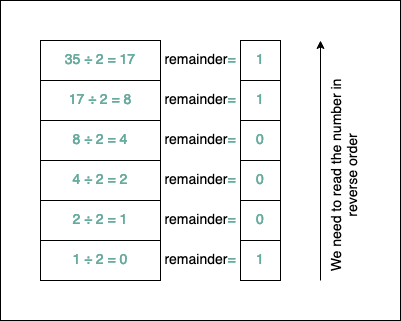
After applying the algorithm, $35_{10}=100011_{2}$. It’s easy to test if things are correct. We take each bit and multiply it by its corresponding power of $2$:
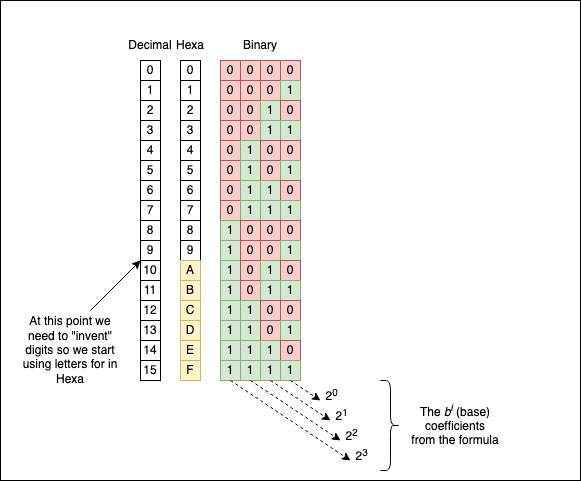
Converting a number from the decimal system to the hexadecimal number system is a little bit trickier. The algorithm remains the same, but because the hexadecimal system has 16 symbols and we only have ten digits (0, 1,…, 9), we need to add additional characters to our set: the letters from A to F. A corresponds to 10, B to 11, C to 12, D to 13, E to 14, and F to 15.
For example, let’s convert 439784 to hexadecimal to see how it looks:
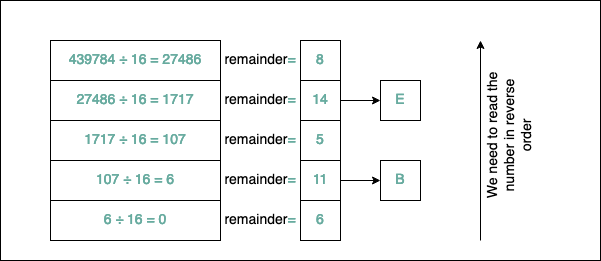
As you can see, $439784_{10}=6B5E8_{16}$. Another popular notation for hexadecimal numbers is 0x6B5E8; you will frequently see the 0x prefix before the number. Similarly, for binary, there’s the 0b prefix before the actual number representation (C doesn’t support this).
Because numbers in the binary numerical system take up so much “space” to represent, you will rarely see them printed in binary; instead, you will see them in hexadecimal.
Personally, when I have to “translate” from binary to hexadecimal and vice-versa, I don’t apply any “mathematical” algorithm. There’s a simple “visual” correspondence we can use:
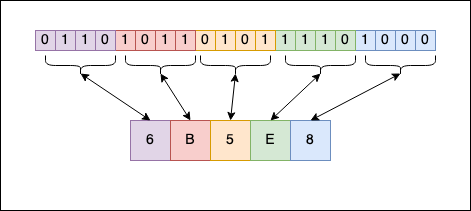
As you can see, each symbol from the hexadecimal format can be represented as a sequence of 4 bits in binary. 8 is 1000, E is 1110, and so on. When you concatenate everything, you get the binary representation of the number from the hexadecimal format. The reverse operation also works. With a little bit of experience (no pun intended), you can do the “transformation” in your head and become one of the guys from The Matrix.
If you don’t have experience with the hexadecimal number system, write the digits on a piece of paper a few times until you memorise them:
A certain symmetry and patterns
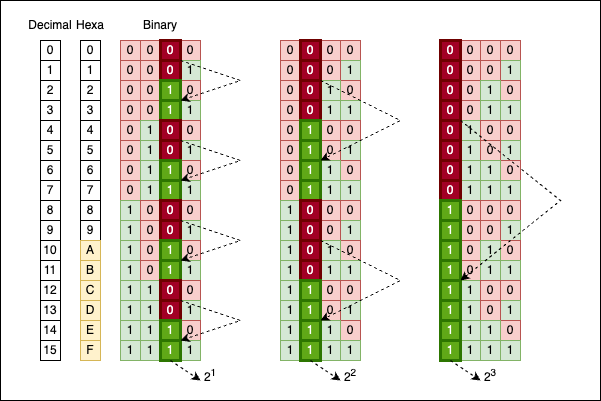
Numbers, especially when represented in binary, have a certain symmetry associated with them. The most obvious pattern is how odd and even numbers alternate between 0 and 1 in their last (least significant) bit:
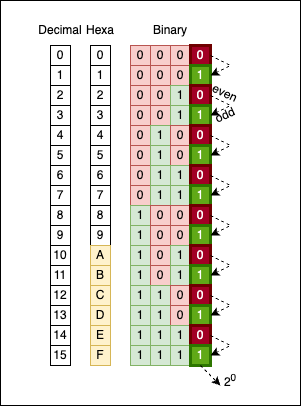
There’s no magic here; it’s simply how the math works. If we move one column to the left (the bits corresponding to $2^1$), you will see groups of two bits alternating: 00 alternates with 11.
If we move one more column to the left (to the bits corresponding to $2^2$), you will see groups of four bits alternating: 0000 alternates with 1111.
Move yet another column to the left (to the bits corresponding to $2^3$), and you will see groups of eight bits alternating: 00000000 alternates with 11111111.
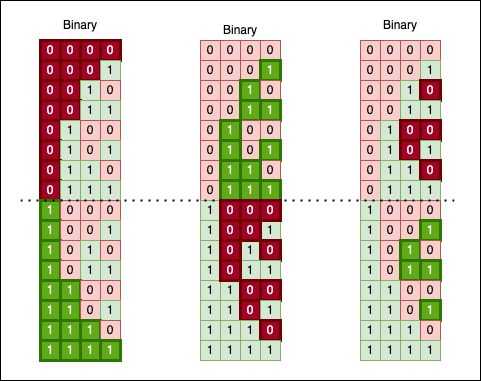
Another fascinating way to look at binary numbers is to “cut” their sequence in half and observe a “mirroring” effect:
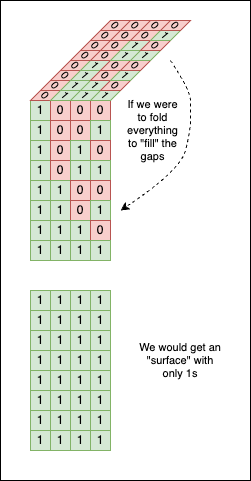
If we use a little imagination, we can even “fold” this bit surface in half. Doing so yields a solid block of 1 bits, as the upper chunk perfectly fills the gaps in the lower one:
You can also spot a “ladder” forming, where each step is double the size of the previous one (look at the green line in the image below):
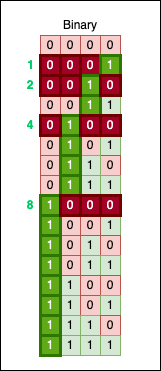
This ladder changes its step whenever it encounters a power of two. Look closely, and you’ll notice another fundamental rule: every power of two has exactly one 1 bit, located precisely at that power’s position.
Numbers and Data Types in C
The C programming language provides numeric data types to store numbers in the computer’s memory. As previously mentioned, they are stored in binary (as a sequence of zeroes and ones). I am sure you’ve heard of char, int, unsigned int, long, long long, float, etc. If you want to refresh your knowledge in this area, I guess this Wikipedia article is more than enough. The biggest problem with these “classic” types was that their size could differ from one machine to another.
For example, char is defined in the standard as an integer type (that can be signed or unsigned) that contains CHAR_BIT bits of information. On most machines, CHAR_BIT is 8, but there were machines where, for reasons beyond the scope of this article, CHAR_BIT was 7. Working on the bits of a char and assuming there are 8 of them (99.99% of cases) would create portability problems on the much fewer systems where CHAR_BIT is 7. (Note: CHAR_BIT is a macro defined in limits.h)
The same goes for the typical int. In the C standard, int doesn’t have a fixed size in terms of the bits it contains, only a lower bound, meaning it should be at least 16 bits long. On my machine, it is 32, so again, portability issues are in sight.
With C99, new fixed-length data types were introduced to increase the portability of the software we write. They can be found in the header file inttypes.h (and in stdint.h). Those are the types I prefer to use nowadays when writing C code:
int8_t: signed integer with 8 bits;int16_t: signed integer with 16 bits;int32_t: signed integer with 32 bits;int64_t: signed integer with 64 bits;
For each intN_t signed integer, there is also a uintN_t counterpart (unsigned integer, N=8,16,32,64). For this reason, we will use the fixed-size integers from stdint.h in our code.
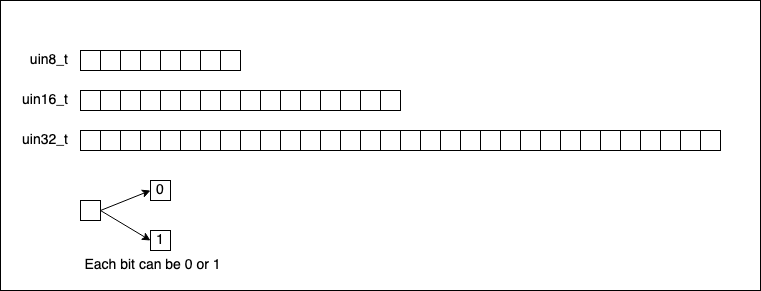
Leaving signed integers aside for a moment (as we will discuss how negative numbers are represented later), if we were to visually represent uint8_t, uint16_t, and uint32_t (skipping uint64_t), they look like this:
The maximum value a uint8_t variable can take is when all its bits are set to 1:
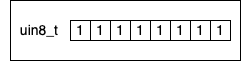
To determine the maximum unsigned integer we can hold in a variable of type uint8_t, we add all the powers of two like this:
$ m = 1 * 2^7 + 1 * 2^6 + 1 * 2^5 + 1 * 2^4 + 1 * 2^3 + 1 * 2^2 + 1 * 2^1 + 1 * 2^0 = \ = 128 + 64 + 32 + 16 + 8 + 4 + 2 + 1 = \ = 255 $
Or, we can use this formula: $\sum_{i=0}^{n} 2^i =2^{n+1}-1$, so for each uintN_t we can come up with this table:
| Unsigned Fixed Type | Maximum Value | C Macro |
|---|---|---|
uint8_t | 28-1=255 | UINT8_MAX |
uint16_t | 216-1=65535 | UINT16_MAX |
uint32_t | 232-1=4294967295 | UINT32_MAX |
uint64_t | 264-1=18446744073709551615 | UINT64_MAX |
Yes, you read that right; there are also macros for all the maximum values. When you are programming, you don’t have to compute anything; it would be a waste of CPU time to redo the math all over again. So everything is stored as macro constants (if such a thing exists):
#include <stdio.h>
#include <stdint.h> // macros are included here

int main(void) {
    printf("%hhu\n", UINT8_MAX);
    printf("%hu\n", UINT16_MAX);
    printf("%u\n", UINT32_MAX);
    printf("%llu\n", UINT64_MAX);
    return 0;
}
Output:
255
65535
4294967295
18446744073709551615
In the code section above, there’s one slight inconvenience: %hhu, %hu, %u, etc., are not the right formats for the fixed-length types. The right formats are defined in inttypes.h as macros:
#include <stdio.h>
#include <stdint.h> // macros are included here
#include <inttypes.h>

int main(void) {
    printf("%" PRIu8 "\n", UINT8_MAX);
    printf("%" PRIu16 "\n", UINT16_MAX);
    printf("%" PRIu32 "\n", UINT32_MAX);
    printf("%" PRIu64 "\n", UINT64_MAX);
    return 0;
}
Funnily enough, on clang, I get warnings for using those typical formats, while on gcc, everything compiles just fine without any warnings:
bits.c:300:26: warning: format specifies type 'unsigned char' but the argument has type 'int' [-Wformat]
    printf("%"PRIu8"\n", UINT8_MAX);
            ~~~~~~~      ^~~~~~~~~
/Library/Developer/CommandLineTools/SDKs/MacOSX.sdk/usr/include/stdint.h:107:27: note: expanded from macro 'UINT8_MAX'
#define UINT8_MAX         255
                          ^~~
bits.c:301:27: warning: format specifies type 'unsigned short' but the argument has type 'int' [-Wformat]
    printf("%"PRIu16"\n", UINT16_MAX);
            ~~~~~~~~      ^~~~~~~~~~
/Library/Developer/CommandLineTools/SDKs/MacOSX.sdk/usr/include/stdint.h:108:27: note: expanded from macro 'UINT16_MAX'
#define UINT16_MAX        65535
Transforming numbers from decimal to other number systems (binary, hexadecimal, etc.)
For this exercise, we will write a C function that takes a uint16_t and prints its representation in other numerical systems to stdout.
For bases larger than 10, we will use the letters from the alphabet. If the base is larger than 36 (10 digits + 26 letters), we will print an error to stderr. We will start by defining an “alphabet” of symbols that maps every number from 0..35 to the digits and letters we have available:
#define MAX_BASE 36
char symbols[MAX_BASE] = {
    '0', '1', '2', '3', '4', '5', '6', '7', '8',
    '9', 'A', 'B', 'C', 'D', 'E', 'F', 'G', 'H',
    'I', 'J', 'K', 'L', 'M', 'N', 'O', 'P', 'Q',
    'R', 'S', 'T', 'U', 'V', 'W', 'X', 'Y', 'Z'
};
// For 0, symbols[0] = '0'
// ...
// For 11, symbol[11] = 'B'
// ...
// For 35, symbol[35] = 'Z'
The next step is to write a function that implements the basic algorithm described in the first section of the article.
#define MAX_BASE 36
char symbols[MAX_BASE] = { /** numbers and letters here */ };

void print_base_iter1(uint16_t n, uint8_t base) {
    // Sanity check
    if (base >= MAX_BASE){
        fprintf(stderr, "Base %d is larger than the maximum accepted base", base);
        return;
    }
    uint16_t r;
    while (n > 0) { // While quotient is bigger than 0
        r = n % base; // Compute the remainder
        n /= base; // Divide by the base again
        fprintf(stdout, "%c", symbols[r]); // Print the symbol
                                           // associated with the remainder
    }
}
Everything looks good, but if we run the function, we will see a slight inconvenience: the symbols are printed in the reverse order of what we want. For example, calling print_base_iter1(1078, 2); will yield the result 01101100001, which is technically correct, but only if we read the number from right to left or use a mirror. Jokes aside, the correct answer is 10000110110.
Now let’s try to convert a number from decimal to hexadecimal to see some letters. By printing print_base_iter1(44008, 16);, the result given by our function is 8EBA. Again, if we read it from right to left, it’s an “excellent” result.
To fix this inconvenience, we can write the results into an intermediary char * (string) to control the order in which we show the characters. Or we can use a Stack data structure, where we push the remainders individually and then print them while popping them out.
Another, simpler solution is to use recursion + the only stack real programmers use (that was a joke!):
#define MAX_BASE 36
char symbols[MAX_BASE] = { /** */ };

static void print_base_rec0(uint16_t n, uint8_t base, uint16_t rem) {
    if (n > 0) {
        uint16_t r = n % base;
        print_base_rec0(n / base, base, r); // calls the function again
                                            // printing the character from the next line
                                            // doesn't happen until the previous call to
                                            // the function is finished
        fprintf(stdout, "%c", symbols[r]);
    }
}

void print_base_rec(uint16_t n, uint8_t base) {
    if (base >= MAX_BASE) {
        fprintf(stderr, "Base %d is larger than the maximum accepted base", base);
        return;
    }
    print_base_rec0(n, base, 0);
}
To simplify things, C supports hexadecimal literals (and though older standards didn’t support binary ones, C23 finally added 0b!), so we can assign numbers in hexadecimal directly to variables. In C, a hexadecimal literal is written with the prefix 0x (or 0X) followed by one or more hexadecimal symbols (digits). Both uppercase and lowercase work.
For example, we can write:
uint32_t x = 0x3Fu;    // 0x3F is 63
                       // another way of writing:
                       //
                       //            uint32_t x = 63

uint32_t y = 0xABCDu;  // 0xABCD is 43981
                       // another way of writing:
                       //
                       //            uint32_t y = 43981
We can also print the hexadecimal representation of a number using "%X" (uppercase letters) or "%x" (lowercase letters) as the format specifier:
int main(void) {
    printf("%x\n", 63);
    printf("%X\n", 43981);
    return 0;
}

// Output:
// 3f
// ABCD
Hexadecimal literals allow us to insert easter eggs in our codebase. For example, this simple line can act as a warning for developers just about to join your project:
printf("%x %x %x %x\n", 64206, 10, 2989, 49374);

// Output:
// face a bad c0de
Unfortunately, in older C codebases, there is no binary literal…
Bitwise operations
Bitwise operations are mathematical operations that manipulate the individual bits of a number (or a set of numbers). As the name suggests, they work directly on bits.
The operations are:
| Symbol | Operation |
|---|---|
& | bitwise AND |
| ` | ` |
^ | bitwise XOR |
~ | bitwise NOT |
Additionally, you have two more operations to shift bits (right or left) inside a number.
| Symbols | Operation |
|---|---|
<< | left SHIFT |
>> | right SHIFT |
If we apply one of the binary operators to two numbers, A and B, we obtain a third number, C, where C = A OP B.
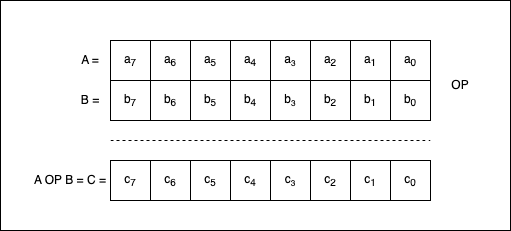
If $a_{7}, a_{6}, …, a_{0}$ are the bits composing A, $b_{7}, b_{6}, …, b_{0}$ are the bits composing B, and $c_{7}, c_{6}, …, c_{0}$ are the bits composing C, then we can say that:
- $c_{7} = a_{7} \text{ OP } b_{7}$;
- $c_{6} = a_{6} \text{ OP } b_{6}$;
- … and so on.
Bitwise AND
In the C programming language, the bitwise AND operator, denoted as & (not to be confused with &&), is a binary operator that operates on two integer operands and returns an integer operand. The operation is performed for each pair of corresponding bits of the operands. The result is a new integer in which each bit position is set to 1 only if the corresponding bits of both operands are also 1. Otherwise, the result bit is set to 0.
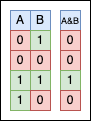
Let’s give it a try in code:
uint8_t a = 0x0Au, b = 0x0Bu;
printf("%x", a & b);

// Output
// a
Explanation: 0x0A is 0b00001010, while 0x0B is 0b00001011. If we were to put the bits side by side and apply & between them, we would get the following:
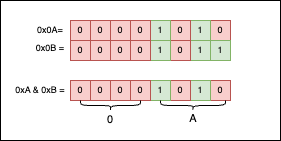
As you can see, only the 1 bits are selected, so the result is 0x0A.
Trying to apply bitwise operations to double or float types won’t work:
double a = 0.0;
printf("%x", a & 1.0);
Error:
bits.c:120:19: error: invalid operands to binary & (have 'double' and 'double')
  120 |     printf("%x", a & 1.0);
      |                    ^
One thing to take into consideration is the fact that & is both associative and commutative.
The associative property means that the grouping of operands does not affect the result. So, if we have three or more operands, we can group them in any way we choose, but the result will remain the same:
// Associativity "smoke test"
uint8_t a = 0x0Au, b = 0x30u, c = 0x4Fu;
printf("%s\n", (((a & b) & c) == (a & (b & c))) ? "True" : "False");

// Output:
// True
Visually, it’s quite an intuitive property, so let’s put a=0x0A, b=0x30, and c=0x4f side by side and see what things look like:
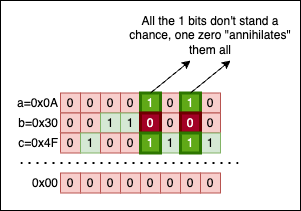
No matter how we group the operands, the result will always be the same: 0x00, because there’s no column containing only 1 bits. A single 0 in a column invalidates everything. Isn’t this demotivational?
The commutative property means that the order of operands doesn’t affect the result. So, for example, writing a & b renders the same result as writing b & a.
// Commutativity "smoke test"
uint8_t a = 0x0Au, b = 0x30u;
printf("%s\n", ((a & b) == (b & a)) ? "True" : "False");

// Output:
// True
Bitwise OR
The bitwise OR (with its symbol: |) is a binary operator that compares the corresponding bits of two integer operands and produces a new value in which each bit is set to 1 if either (or both) of the corresponding bits in the operands are 1.
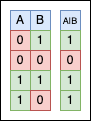
Again, let’s try using | in our code:
uint8_t a = 0xAAu, b = 0x03u;
printf("%x", a | b);

// Output
// AB
Explanation: 0xAA is 0b10101010, while 0x03 is 0b00000011. If you put the two numbers side by side and apply | to their bits, we get the result 0xAB. Visually, things look like this:
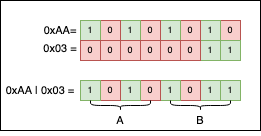
If we look at the columns, and there’s at least one 1 bit, the result for that column will be 1, regardless of any 0s (zeroes).
Just like &, | is both associative and commutative. Demonstrating this is outside the scope of this article, but simply put: if there’s a single 1 in the column, no matter how many 0 bits we may encounter, the result will always be 1. A single 1 has the power to change everything. Isn’t this motivational?
Bitwise XOR
The bitwise XOR operator (^) is a binary operator that compares the corresponding bits of two operands and returns a new value where each bit is set to 1 if the corresponding bits of the operands are different, and 0 if they are the same.
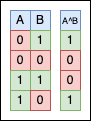
Two identical numbers, a and b, will always XOR to 0 because all the matching bits will nullify themselves.
So, if a == b, then a ^ b == 0:
uint8_t a = 0xAFu, b = 0xAFu;
printf("a==b is %s\n", (a == b) ? "True" : "False");
printf("a^b=0x%x\n", a ^ b);

// Output
// a==b is True
// a^b=0x0
Because we like patterns, we can also use 0xAA ^ 0x55 == 0xFF; visually, it’s more satisfying than any other example I could think of:
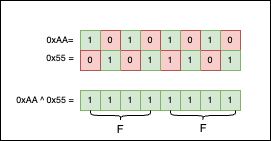
Like & and | before it, ^ is an associative and commutative operation. So, another useless but interesting observation we can make is that XORing all the numbers in a loop up to a power of two (>= 2) is always 0. Philosophically speaking, XOR is the killer of symmetry:
void xoring_power_two() {
    // An array containing a few powers of 2
    uint8_t pof2[4] = {4, 8, 16, 32};
    // For each power of two
    for(int i = 0; i < 4; i++) {
        uint8_t xored = 0;
        // XOR all numbers < the current power of two
        for(int j = 0; j < pof2[i]; j++) {
            printf(" 0x%x %c", j, (j != (pof2[i]-1)) ? '^' : 0);
            xored ^= j;
        }
        // Print the final result `= xored`
        printf("= 0x%x\n", xored);
    }
}

// Output
//  0x0 ^ 0x1 ^ 0x2 ^ 0x3 = 0x0
//  0x0 ^ 0x1 ^ 0x2 ^ 0x3 ^ 0x4 ^ 0x5 ^ 0x6 ^ 0x7 = 0x0
//  0x0 ^ 0x1 ^ 0x2 ^ 0x3 ^ 0x4 ^ 0x5 ^ 0x6 ^ 0x7 ^ 0x8 ^ 0x9 ^ 0xa ^ 0xb ^ 0xc ^ 0xd ^ 0xe ^ 0xf = 0x0
//  0x0 ^ 0x1 ^ 0x2 ^ 0x3 ^ 0x4 ^ 0x5 ^ 0x6 ^ 0x7 ^ 0x8 ^ 0x9 ^ 0xa ^ 0xb ^ 0xc ^ 0xd ^ 0xe ^ 0xf ^ 0x10 ^ 0x11 ^ 0x12 ^ 0x13 ^ 0x14 ^ 0x15 ^ 0x16 ^ 0x17 ^ 0x18 ^ 0x19 ^ 0x1a ^ 0x1b ^ 0x1c ^ 0x1d ^ 0x1e ^ 0x1f = 0x0
If we picture this in our heads, this result is not surprising:
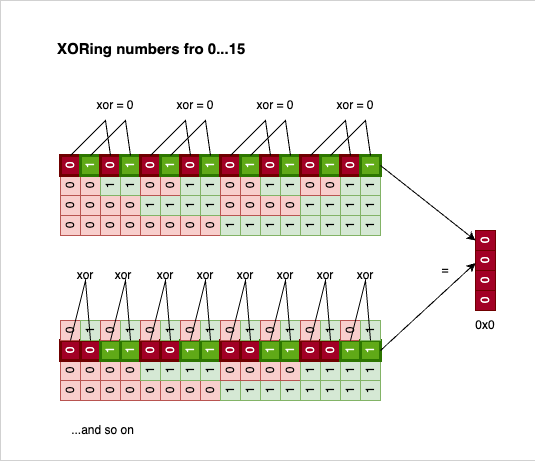
Every bit has a pair; all pairs are 0, XORing 0 with 0 is 0, and everything reduces to nothing.
Bitwise NOT
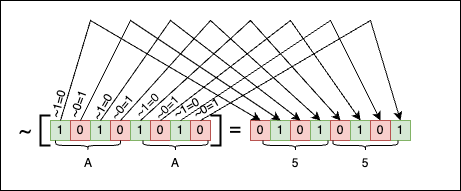
In the C Programming language, the bitwise NOT is a unary operator denoted by the ~ character. It works on a single operand, negating all the operand’s bits by changing 1s to 0s and 0s to 1s.

Negating 0b0001 is 0b1110, negating 0b0000 is 0b1111, and so on…
For example:
uint16_t a = 0xAAAAu; // a = 1010 1010 1010 1010 == 0xAAAA
uint16_t b = ~a;     // b = 0101 0101 0101 0101 == 0x5555
printf("0x%X\n", a);
printf("0x%X\n", b);

// Output
// 0xAAAA
// 0x5555
And visually things look like this:
Left Shift
The left shift operation is a bitwise operation, denoted with the symbols <<, that shifts the bits of a binary number to the left by a specified number of positions.
So, for example, if we want to shift the bits of 0b00000010 (or 0x02) by three positions, we can write something like this:
uint8_t a = 0x02u;   // 0b 0000 0010 = 0x02
uint8_t b = a << 3;  // 0b 0001 0000 = 0x10
printf("After shift: 0x%x\n", b);

// Output
// After shift: 0x10
Visually things look like this:
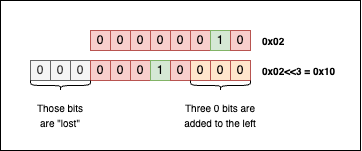
When shifting bits to the left, the bits that “fall off” the left end are lost, and the resulting empty spots on the right are filled with zeros.
Right Shift
The right shift operation is a bitwise operation, denoted with the symbols >>, that shifts the bits of a binary number to the right by a specified number of positions.
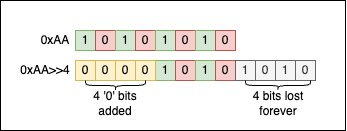
So, for example, if we want to shift 0xAA by 4 positions, performing 0xAA >> 4 will give us 0x0A:
uint8_t a = 0xAAu;   // 1010 1010 = 0xAA
uint8_t b = a >> 4;  // 0000 1010 = 0x0A
printf("After shift: 0x%X\n", b);

// Output
// After shift: 0xA
Visually things look like this:
Negative numbers and their binary representation
Reading through this point, you may feel an elephant lurking in the server room. We haven’t touched on a vital subject: How are signed integers represented in binary?
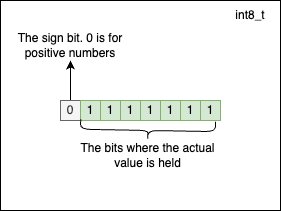
In the C programming language, fixed-size signed integers are represented using Two’s Complement. The most significant bit of the number (also called the MSB) is used for the sign, and the rest of the bits are used to store the number’s value. The sign bit is 0 for positive numbers and 1 for negative numbers. By convention, the number 0 is considered a positive number.
In Two’s Complement, the negative version of a number is obtained by flipping all the bits of the positive value (~) of the number and then adding 1.
For example, to obtain the binary representation of -47, we should do the following:
- Transform
47into binary:00101111; - Flip the bits of
47:11010000; - Add
1to the result of the previous step:11010001.
So, -47 in binary is 11010001.
Another example. To obtain the binary representation of -36, we should do the following:
- Transform
36into binary:00100100; - Flip the bits of
36:11011011; - Add
1to the result from the previous step:11011100.
There’s one bit less available to represent the actual numerical value for signed integers because the sign bit is reserved. The maximum positive value an int8_t can hold is $2^7 - 1 = 127$, and it has the following representation:
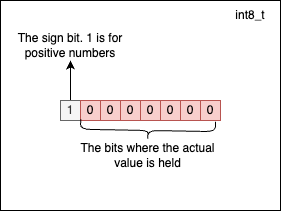
The minimum value a signed integer of type int8_t can hold is $-2^7 = -128$. At this point, you may wonder why we have -128 for negatives versus 127 for positives. This happens because 0 is considered to be positive by convention. -128 has the following representation:
You don’t have to do any computations to determine the maximum and minimum values a signed fixed-length type can hold. The limits are already defined as macro constants in <stdint.h>:
#include <stdio.h>
#include <stdint.h> // constant macros are included here

int main(void) {
    printf("int8_t is in interval: [%hhd, %hhd]\n", INT8_MIN, INT8_MAX);
    printf("int16_t is in interval: [%hd, %hd]\n", INT16_MIN, INT16_MAX);
    printf("int32_t is in interval: [%d, %d]\n", INT32_MIN, INT32_MAX);
    printf("int64_t is in interval: [%lld, %lld]\n", INT64_MIN, INT64_MAX);
    return 0;
}
// Output
// int8_t is in the interval: [-128, 127]
// int16_t is in the interval: [-32768, 32767]
// int32_t is in the interval: [-2147483648, 2147483647]
// int64_t is in the interval: [-9223372036854775808, 9223372036854775807]
Just like in the previous example, it’s advisable to use the correct string formats for the family of fixed-length signed integers: PRId8, PRId16, etc.
Pitfalls to avoid when using bitwise operations
In the C programming language, UB (a cute acronym for Undefined Behavior) refers to situations (usually corner cases, but not always) where the C Standard does not specify the expected result after executing a piece of code. In these cases, compilers can choose to handle things their own way: by crashing, giving erroneous or platform-dependent results (which is often worse than crashing), or trolling us with Heisenbugs. Most cases of UB are obvious, while others are incredibly subtle and hard to detect.
In the C community, undefined behaviour may be humorously called “nasal demons” after a comp.std.c post that explained undefined behaviour as allowing the compiler to do anything it chooses, even “to make demons fly out of your nose”. (source)
Just as with manual memory management, there are a few things you must take into consideration when writing C code that uses bitwise operations:
A. Do not shift bits by an amount greater than (or equal to) the width of the type:
uint8_t a = 32;
uint8_t b = a << 32; // Undefined behavior!
                     // The code compiles just fine,
                     // but don't assume the number is 0x0
If you try to compile this simple piece of code with -Wall, the compiler (both clang and gcc) will warn you about the potential problem, but the code will still successfully compile:
bits.c:150:19: warning: left shift count >= width of type [-Wshift-count-overflow]
  150 |     uint8_t b = a << 32; // undefined behavior
If you execute the code after compiling it, b might be 0. But don’t assume it will be 0 on all platforms or with all compilers. That is a dangerous assumption.
Also, don’t rely purely on compiler warnings. They can only catch issues in specific, predictable cases. Take a look at this code that can lead to UB:
srand(time(NULL));
uint8_t a = 32;
int shifter = rand();
uint8_t b = a << shifter;
printf("%hhu\n", b);
This code compiles without any warnings and executes just fine. Because the compiler couldn’t determine the value of shifter at compile time, no warning was raised. So, whenever you are performing bitwise operations (especially shifts), you had better know exactly what you are doing.
B. Do not shift bits by negative amounts:
uint8_t a = 0x1u;
uint8_t b = a << -2; // Undefined behavior!
                     // The code compiles just fine.
C. Do not shift signed integers in a way that causes sign changes:
int8_t a = -1;
int8_t b = a << 1; // Undefined behavior!
                   // The code compiles just fine.
The result of E1 « E2 is E1 left-shifted E2 bit positions; vacated bits are filled with zeros. If E1 has an unsigned type, the value of the result is E1 × 2E2, reduced modulo one more than the maximum value representable in the result type. If E1 has a signed type and nonnegative value, and E1 × 2E2 is representable in the result type, then that is the resulting value; otherwise, the behavior is undefined.
Mandatory Computer Science Exercise - The Solitary Integer
Now that we understand the basics of bitwise operations, let’s solve a classic computer science exercise called The Solitary Integer. If you are curious, you can find it on LeetCode and HackerRank (under the name The Lonely Integer).
The ask is straightforward:
Given an array of integer values where all elements but one occur twice, find the unique element, the so-called solitary integer.
For example, if
L = {1, 2, 3, 3, 8, 1, 9, 2, 9}, the unique element is8, because the rest of the elements come in pairs.
Your first instinct to solve this exercise might be to brute-force the solution by comparing each element with every other element to find its pair. However, the time complexity of doing so is O(n²), where n is the size of the input array… not exactly ideal.
But, as a rule of thumb, if you receive a question like this in an interview and don’t immediately know how to approach it, mentioning the brute-force solution is a great starting point. It shows your thought process and buys you some time until you come up with something better.
There are, of course, other alternative solutions:
- Sorting the array in
O(n log n)time and then iterating through it withi += 2. IfL[i] != L[i+1], you’ve just found the lonely integer. - Using a hash table to count the frequency of the numbers. If the frequency of a key is
1, the problem is solved; you’ve found the lonely integer.
But all those solutions are slightly overkill if you know about XOR. As we established earlier, XOR nullifies identical bits. We also know that XOR is associative and commutative. So, why don’t we just apply XOR across all the numbers? In the end, only the bits without pairs will “survive.” Those surviving bits hold the answer to our problem.
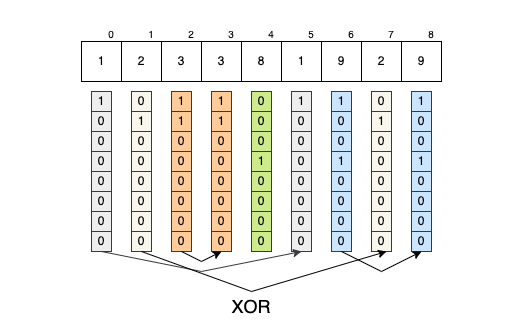
- The bits of
array[0]will (eventually) nullify themselves with the bits fromarray[5]=>array[0] ^ array[5] == 0; - The bits of
array[1]will (eventually) nullify themselves with the bits fromarray[7]=>array[1] ^ array[7] == 0; - The bits of
array[2]will (eventually) nullify themselves with the bits fromarray[3]=>array[2] ^ array[3] == 0; - The bits of
array[6]will (eventually) nullify themselves with the bits fromarray[8]=>array[6] ^ array[8] == 0; - The bits of
array[4]will remain unaltered; they represent the solution.
So, the solution to the exercise becomes:
#include <stdio.h>

static int with_xor(int *array, size_t array_size) {
      int result = 0;
      for(size_t i = 0; i < array_size; ++i) {
          result ^= array[i];
      }
      return result;
}

int main(void) {
    int array[9] = {1, 2, 3, 3, 8, 1, 9, 2, 9};
    printf("%d\n", with_xor(array, 9));
    return 0;
}

// Output
// 8
Printing numbers in binary by using bitwise operations
In a previous section of the article, we devised a general solution to transform numbers from one numeric system to another. Chances are, we will never actually have to convert a number to base 11. So why not write a dedicated function that prints a number in binary format using bitwise operations?
The simplest solution I could think of is the following:
void print_bits_simple_rec(FILE *out, uint16_t n) {
    if (n >> 1)
        print_bits_simple_rec(out, n >> 1);
    fprintf(out, "%d", n & 0x1u);
}
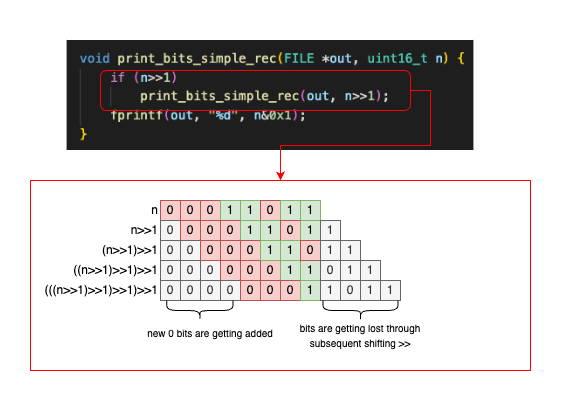
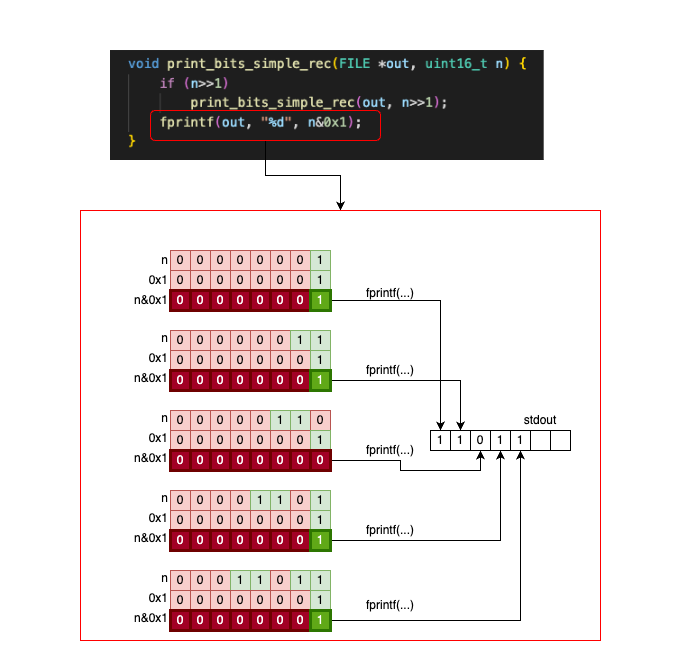
print_bits_simple_rec is a recursive function that takes a uint16_t and prints its bits. At each recursive call, we shrink the number by shifting it one bit to the right (n >> 1). We stop the recursive calls once the number reaches 0. After the recursive stack is built, we print the last (least significant) bit of the number for each call (n & 0x1).
It is beyond the scope of this article to explain recursion in depth, but let’s see how things execute if we call the function on n = 0b00011011:
And then, once n = 0b00000001, the stack unwinds, and we start printing the characters backwards:
That’s one idea. Another idea is to use a value table where we keep the binary strings associated with all the binary numbers from 0 to 15:
const char* bit_rep[16] = {
    "0000", "0001", "0010", "0011",
    "0100", "0101", "0110", "0111",
    "1000", "1001", "1010", "1011",
    "1100", "1101", "1110", "1111",
};
We can then write a few functions that re-use bit_rep. For example, if we plan to print a uint8_t, all we need to do is write this function:
void print_bits_uint8_t(FILE *out, uint8_t n) {
    fprintf(out, "%s%s", bit_rep[n >> 4], bit_rep[n & 0xF]);
}
int main(void) {
    uint8_t n = 145;
    print_bits_uint8_t(stdout, n);
}

// Output
// 10010001
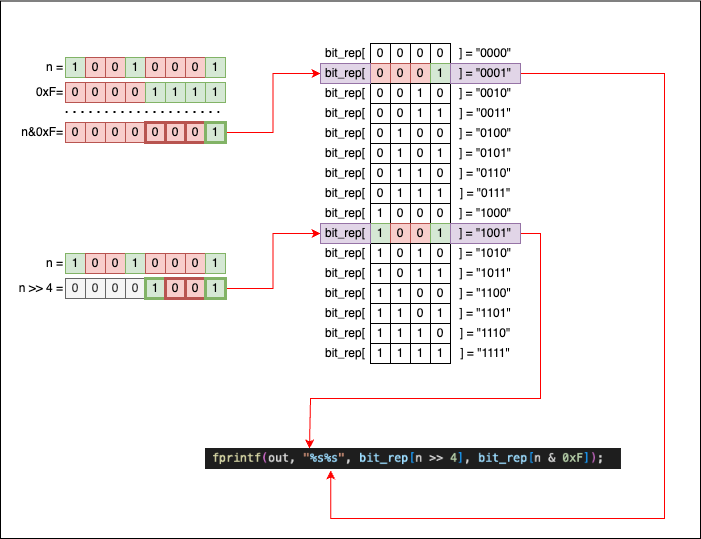
This new function works like this:
- A
uint8_t nhas 8 bits in total. - If we split
ninto two halves of 4 bits each (nibbles), we can usebit_rep[half1]andbit_rep[half2]to print the full content ofn. - To split
ninto these two halves, we have to:- Use
n >> 4to get the first 4 bits. - Use
n & 0xFto get the last 4 bits.
- Use
If you are confused about n >> 4 and n & 0xF, let’s visualize what’s happening and how the bits move. We will use n = 145 as our example:
If we consider the following:
- One
uint16_tvariable can be split into twouint8_tvalues. - One
uint32_tvariable can be split into twouint16_tvalues. - One
uint64_tvariable can be split into twouint32_tvalues.
We can then write the following code, where each function re-uses the function of the smaller type. The idea is exactly the same: we split the larger type into two halves and pass them to the function associated with the smaller type.
void print_bits_uint8_t(FILE *out, uint8_t n) {
    fprintf(out, "%s%s", bit_rep[n >> 4], bit_rep[n & 0xFu]);
}
void print_bits_uint16_t(FILE *out, uint16_t n) {
    print_bits_uint8_t(out, n >> 8); // first 8 bits
    print_bits_uint8_t(out, n & 0xFFu); // last 8 bits
}
void print_bits_uint32_t(FILE *out, uint32_t n) {
    print_bits_uint16_t(out, n >> 16); // first 16 bits
    print_bits_uint16_t(out, n & 0xFFFFu); // last 16 bits
}
void print_bits_uint64_t(FILE *out, uint64_t n) {
    print_bits_uint32_t(out, n >> 32); // first 32 bits
    print_bits_uint32_t(out, n & 0xFFFFFFFFu); // last 32 bits
}
Having separate functions for each type is not ideal, but it is quite common in the C programming language. Fortunately, we can use the _Generic macro to group these functions together.
#define print_bits(where, n) _Generic((n), \
                uint8_t: print_bits_uint8_t, \
                int8_t: print_bits_uint8_t, \
                uint16_t: print_bits_uint16_t, \
                int16_t: print_bits_uint16_t, \
                uint32_t: print_bits_uint32_t, \
                int32_t: print_bits_uint32_t, \
                uint64_t: print_bits_uint64_t, \
                int64_t: print_bits_uint64_t) \
            (where, n)
So now, we can simply call print_bits() regardless of the input type (Note: as long as the type is explicitly covered by a branch in the _Generic macro):
uint8_t a = 145;
uint16_t b = 1089;
uint32_t c = 30432;
int32_t d = 3232;

print_bits(stdout, a); printf("\n"); // works on uint8_t!
print_bits(stdout, b); printf("\n"); // works on uint16_t!
print_bits(stdout, c); printf("\n"); // works on uint32_t!
print_bits(stdout, d); printf("\n"); // works on int32_t!

// Output
// 10010001
// 0000010001000001
// 00000000000000000111011011100000
// 00000000000000000000110010100000
Masking
In low-level programming, bitwise masking involves manipulating the individual bits of a number (represented in binary) using the operations we described in the previous sections (&, |, ~, ^, >>, <<). A mask is simply a binary pattern used to extract or manipulate specific bits of a given value.
Using bitmasking techniques, we can:
- Set a specific bit to a particular value (
0or1); - Clear a specific bit, or a specific portion of bits, from a number;
- Flip the values of some or all bits in a number;
- …and much more.
Let’s take a look at the previously defined function, print_bits_uint8_t, that prints the binary representation of a uint8_t:
void print_bits_uint8_t(FILE *out, uint8_t n) {
    fprintf(out, "%s%s", bit_rep[n >> 4], bit_rep[n & 0xFu]);
}
0xF is the mask we use to select the last 4 bits of n. This happens when we apply n & 0xF: all the 1 bits in the mask are used to extract information from n, while all the 0 bits in the mask discard information from n:
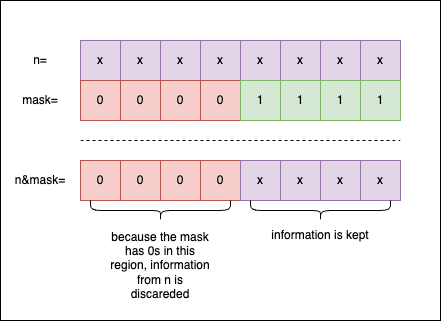
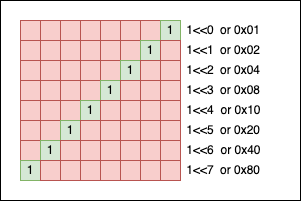
When creating a mask, we can write the pattern by hand using hexadecimal literals, or we can express it using powers of 2. For example, if you want a simple mask for a single bit at the $n$-th position, we can write: 1 << n. Mathematically, $2^n$ is equivalent to 1 << n:
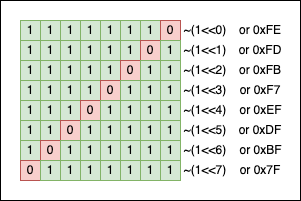
We can also “flip” the mask using the ~(mask) operation:
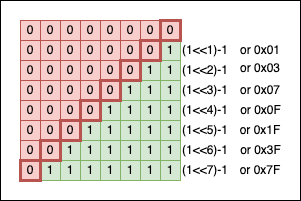
To get a “contiguous” zone of 1s, we can subtract 1 from the corresponding power of two:
The power of masking - Pairwise Swap
In the famous book Cracking the Coding Interview, there’s an exercise where the reader is asked to swap the even bits with the odd bits inside a number:

If you ignore the requirement to use as few instructions as possible, our typical programmer’s reflex would be to:
- Store all the bits of the number in an array;
- Perform the swaps inside the array;
- Recreate the number based on the new array configuration.
Of course, a much more elegant solution uses bitwise operations and masking techniques. Spoiler alert: we will start with the actual solution, followed by an in-depth explanation:
uint16_t pairwise_swap(uint16_t n) {
    return ((n & 0xAAAAu) >> 1) | ((n & 0x5555u) << 1);
}
Cryptic, but simple:
uint16_t n = 0xBCDDu;
uint16_t n_ps = pairwise_swap(n);
print_bits(stdout, n); printf("\n");
print_bits(stdout, n_ps); printf("\n");

// Output
// 1011110011011101
// 0111110011101110
The key to understanding the solution lies in the patterns created by the binary numbers 0xAAAA and 0x5555. 0xAAAA selects all the even bits of n, while 0x5555 selects all the odd bits. If we put the numbers side by side, we can see that:
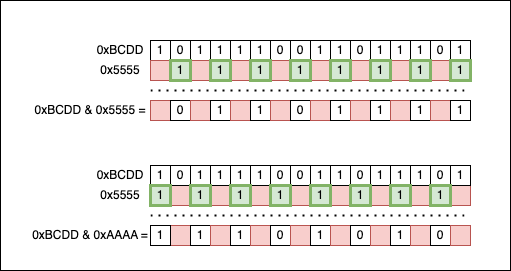
At this point, the information initially contained in the input number (n = 0xBCDD) is split into two halves:
n & 0x5555isolates the odd bits of0xBCDD;n & 0xAAAAisolates the even bits of0xBCDD.
Now we need to swap them. We will shift the even bits one position to the right (>> 1), and the odd bits one place to the left (<< 1), so they take each other’s original places. To recombine the two interlacing patterns back together, we use the bitwise OR (|) operation.
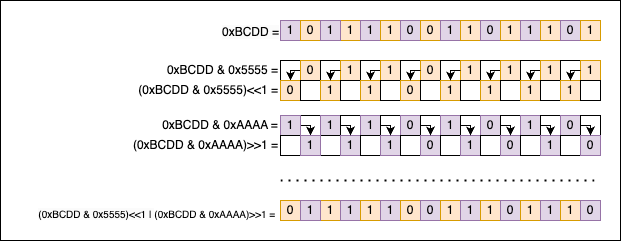
Getting, Setting, Clearing, and Toggling the nth bit
Getting the nth bit of a number
To get the nth bit of a number n, we can use the >> and & bitwise operations:
- We right-shift the number (
>>) bynthpositions. - We apply a simple bitwise AND mask (
& 0x1) to obtain the final bit.
Most online resources (ChatGPT included) will recommend the following two solutions for retrieving the nth bit:
As a macro:
#define GET_BIT(n, pos) (((n) >> (pos)) & 1)
Or as a function:
int get_bit(int num, int n) {
    return (num >> n) & 0x1u;
}
Visually, both solutions work like this:
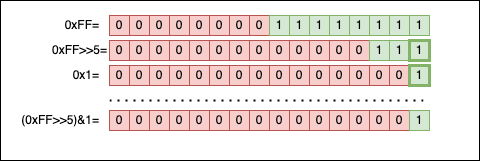
I prefer using a function instead of a macro, depending on the context. It’s always best to validate the input and ensure n is not negative or larger than the size (in bits) of num. Otherwise, things can escalate to Undefined Behavior (UB) really fast:
inline uint8_t get_nth_bit(uint32_t num, uint32_t nth) {
    if (nth >= 32) {
        // Catch error
        // Log & Manage the error
    }
    return (num >> nth) & 0x1u;
}
Let’s try it in practice now:
int main(void) {
    uint32_t n = 0xFFu;
    int i = 0;

    printf("Printing the first 8 bits (from LSB to MSB):\n");
    for(; i < 8; i++)
        printf("%hhu", get_nth_bit(n, i));

    printf("\nPrinting the next 24 bits:\n");
    for(; i < 32; i++)
        printf("%hhu", get_nth_bit(n, i));

    return 0;
}

// Output
// Printing the first 8 bits (from LSB to MSB):
// 11111111
// Printing the next 24 bits:
// 000000000000000000000000
Setting and Clearing the nth bit of a number
A specific bit of a number n can be set to 0 (often called clearing) or 1 (often called setting). Depending on the context, we can end up using two different macros or functions:
// Macros
#define set_nth_bit1(num, pos) ((num) |= (1u << (pos)))
#define set_nth_bit0(num, pos) ((num) &= ~(1u << (pos)))

// Or functions
inline void set_nth_bit0(uint32_t *n, uint8_t nth) {
    *n &= ~(1u << nth);
}

inline void set_nth_bit1(uint32_t *n, uint8_t nth) {
    *n |= (1u << nth);
}
Because both the functions and macros can lead to UB if shifted out of bounds, it’s highly advisable to validate nth to make sure it’s strictly smaller than the length (in bits) of the type of n (in our case it’s uint32_t, so nth must be < 32).
Using the functions in code:
uint32_t n = 0x00FFu;
print_bits(stdout, n); printf("\n");

// Clear the 5th bit (set to 0)
set_nth_bit0(&n, 5);
printf("bit 5 of n is: %hhu\n", get_nth_bit(n, 5));
print_bits(stdout, n); printf("\n");

// Set the 5th bit (set to 1)
set_nth_bit1(&n, 5);
printf("bit 5 of n is: %hhu\n", get_nth_bit(n, 5));
print_bits(stdout, n); printf("\n");

// Output
// 00000000000000000000000011111111
// bit 5 of n is: 0
// 00000000000000000000000011011111
// bit 5 of n is: 1
// 00000000000000000000000011111111
Visually, set_nth_bit0 (clearing a bit) looks like this:
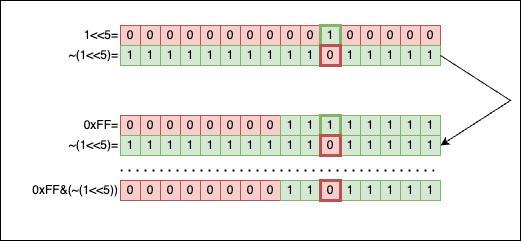
Applying & between 0 and 1 will always return 0. So we create a mask for the 5th bit (1 << 5), we flip it (~(1 << 5)) so we get a 0 exactly at the 5th position (and 1s everywhere else), and then we apply a bitwise AND (&). The 1 in the original number doesn’t stand a chance, it is wiped out.
Visually, set_nth_bit1 (setting a bit) looks like this:
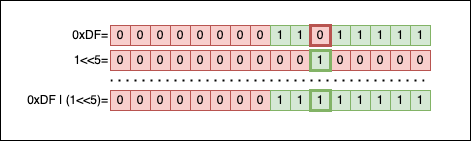
Applying | between 0 and 1 returns 1. So we create a mask for the 5th bit (1 << 5), then apply | between the mask and the number to fill the gap.
Toggling the nth bit of a number
Toggling a bit means changing the value of a specific bit from 0 to 1, or from 1 to 0, while leaving all the other bits unchanged.
Your first reflex might be to re-use the previously defined functions set_nth_bit1(...) and set_nth_bit0(...) to improvise something like this:
void toggle_nth_bit(uint32_t *n, uint8_t nth) {
    if (get_nth_bit(*n, nth) == 0) {
        set_nth_bit1(n, nth);
    } else {
        set_nth_bit0(n, nth);
    }
}
But there’s a much better and simpler way that avoids branching altogether by using XOR:
void toggle_nth_bit(uint32_t *n, uint8_t nth) {
    *n ^= (1u << nth);
}
The idea is incredibly simple: we create a mask with a 1 exclusively on the nth position (1 << nth), and then we bitwise XOR (^) the number n with this mask. This will preserve all the bits of n, except for the nth bit, which will securely flip its value depending on its current state.
Let’s visualize this by imagining a call to toggle_nth_bit(0xF0u, 3):
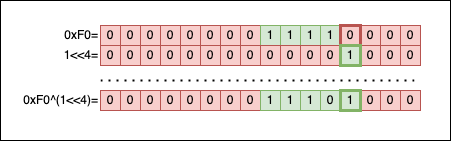
The result of toggle_nth_bit(0xF0u, 3) should be 0xF8:
uint32_t n = 0xF0u;
toggle_nth_bit(&n, 3);
if (n == 0xF8u) {
    printf("It works!\n");
}

// Output
// It works!
And if we perform the inverse operation on the exact same bit:
uint32_t n = 0xF8u;
toggle_nth_bit(&n, 3);
if (n == 0xF0u) {
    printf("It works again!\n");
}

// Output
// It works again!
Clearing and Replacing a bit portion of a number
Clearing the last bits of a number
Let’s say we have a number n. Our task is to write a generic function that clears the last nbits of that number.
The solution is simple:
- We need to create a mask where all the bits are
1, except the lastnbits, which are0. - We apply a bitwise
AND(&) operation betweennand the newly created mask.
To create the mask, we start with a value where all the bits are set to 1. This value can be easily obtained by flipping all the bits of 0 (~0x0u). Next, we left-shift by nbits and, voilà, the mask is ready.
The code is:
void clear_last_bits(uint32_t *n, uint8_t nbits) {
    *n &= (~0x0u << nbits);
}
To test it, let’s try to clear the last 4 bits of 0xFF. The result should be 0xF0:
uint32_t n = 0xFFu;
clear_last_bits(&n, 4);
if (n == 0xF0u) {
    printf("It works!\n");
}

// Output
// It works!
Visually, the operation looks like this:
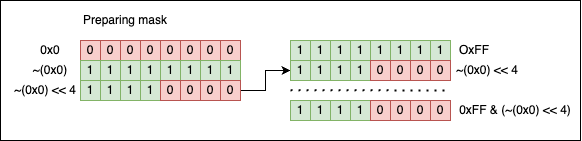
Replacing multiple bits
In this case, the task is simple: given a uint16_t and two bit indices, i and j, we need to write a function that replaces all the bits between i and j (inclusive) from n with the value of m. In other words, m becomes a substring of n that starts at i and ends at j.
The signature of the function should be the following:
void replace_bits(uint16_t *n, uint16_t m, uint8_t i, uint8_t j);
A simple solution that doesn’t impose any validation on i, j, or m would look like this:
void replace_bits(uint16_t *n, uint16_t m, uint8_t i, uint8_t j) {
    // Create a mask to clear the bits from i to j inside n
    // The mask is made out of two parts that are stitched together using
    // a bitwise OR
    uint16_t mask = (~0x0u << (j + 1)) | ((1 << i) - 1);

    // Clear the bits associated with the mask
    *n &= mask;

    // Align the bits to be replaced
    m <<= i;

    // Replace the bits from n with the value of m
    *n |= m;
}
Executing the code:
uint16_t n = 0xDCBEu;
print_bits(stdout, n); printf("\n");

replace_bits(&n, 0x1u, 3, 6);
print_bits(stdout, n); printf("\n");

// Output
// 1101110010111110
// 1101110010001110
As you can see, the bits from positions 3 to 6 (inclusive) were replaced with the value of 0x1, which is 0b0001 in binary.
To understand what’s happening behind the scenes, we should go through the algorithm step by step.
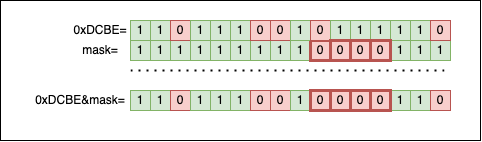
First, we need to build a mask that selects the interval defined by i and j. The mask will be created by stitching together two sections using the bitwise OR (|). The line of code where we create the mask is: uint16_t mask = (~0x0u << (j + 1)) | ((1 << i) - 1);. Visually, it works like this:
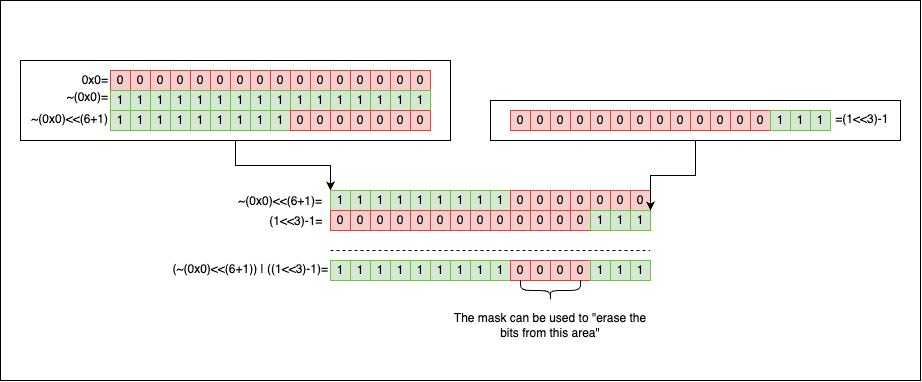
The second step is to use the resulting mask to clear the bits from i to j (inclusive) inside n by applying *n &= mask;:
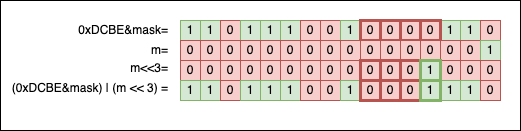
The third step is to shift the bits of m left by i positions to align them with the newly created empty portion inside n. Finally, we use the shifted m as a new mask to fill the gap: *n |= m;:
Reading multiple bits
Reading multiple bits (instead of replacing them) is a similar task to the one described above. We must write a method that works on an uint16_t and two bit indices i and j. We need to extract and return the value of all the bits between i and j (including j).
A proposed C function might look like this:
uint16_t get_bits(uint16_t input, uint8_t i, uint8_t j) {
    uint16_t mask = (1u << (j - i + 1)) - 1;
    mask <<= i;
    return (input & mask) >> i;
}
Or, if we enjoy confusing our colleagues, we can try something like this:
uint16_t get_bits2(uint16_t input, uint8_t i, uint8_t j) {
    uint16_t mask = (1u << (j + 1)) - (1 << i);
    return (input & mask) >> i;
}
When we try them in practice, magic unfolds:
uint16_t n = 0xDCBE;
print_bits(stdout, n); printf("\n");
replace_bits(&n, 0x7u, 3, 6);
print_bits(stdout, n); printf("\n");
print_bits(stdout, get_bits(n, 3, 6)); printf("\n");
print_bits(stdout, get_bits2(n, 3, 6)); printf("\n");

// Output
// 1101110010111110
// 1101110010111110
// 0000000000000111
// 0000000000000111
It all boils down to how we’ve decided to implement the masking mechanisms:
uint16_t mask = (1u << (j - i + 1)) - 1; mask <<= i; // ORuint16_t mask = (1u << (j + 1)) - (1u << i);
As you can see, in both versions (get_bits and get_bits2), we’ve decided to create the mask in one go without stitching together two sections as we did in replace_bits.
Let’s take the first version to exemplify further. If we look closer, there’s no magic involved.
(1 << (j - i + 1))      -1
------------------
   power of two         -1
That’s a power of two from which we subtract 1. We know the bit pattern associated with that kind of number ($2^n-1$):
So, visually speaking, the mask forms like this:
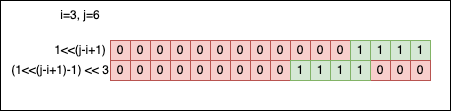
j-i+1gives the length of the mask (the contiguous zone of1bits);- The second shift
mask <<= iput1bits to the right position.
Bitwise operations and their relationship with the powers of two
There’s a strong relationship between bitwise operations and mathematical operations involving powers of two. This shouldn’t be a mystery or a surprise; after all, we use the powers of two to represent numbers in the binary system.
Multiplying a number by a power of two
Multiplying a number $a$ by a power of two, $a * 2^{n}$, is equivalent to writing a << n, which shifts the bits of a to the left by n positions.
There’s a clear mathematical demonstration for this. If we go back to the beginning of the article and re-use the formula stated there, we know a number in the binary system can be written as a sum of the powers of two: $A_{2} = \sum_{i=0}^{n} a_i * 2^i$, where $a_{i} \in {0, 1}$. If we multiply both sides of the equation by $2^m$, the relationship becomes:
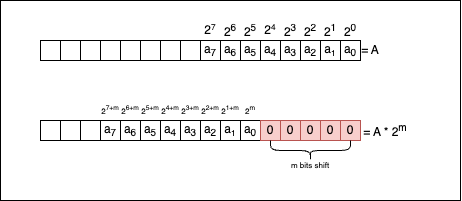
We can intuitively understand that the first m bits of information were shifted. Now, when we sum, we don’t start with $2^0$ anymore, but rather with $2^{m}$, so that:
So, if we were to link the mathematical formula with what’s actually happening at the bit level, let’s take a look at the following picture:
Now let’s see if the compiler knows how to optimise the multiplication without being explicitly told to do so. Consider the following code:
int main(void) {
    srand(0);
    int i = rand();
    for(; i < (1 << 12); i *= 4) {
        printf("%d\n", 1);
    }
    return 0;
}
You can see that instead of writing i <<= 2 in the loop, we preferred to use the more readable i *= 4. If we compile the code (gcc -O3 for x86-64) and look at the resulting assembly:
.LC0:
        .string "%d\n"
main:
        push    rbx
        xor     edi, edi
        call    srand
        call    rand
        cmp     eax, 4095
        jg      .L2
        mov     ebx, eax
.L3:
        mov     esi, 1
        mov     edi, OFFSET FLAT:.LC0
        xor     eax, eax
        ; Shifts the value in ebx to the left by 2 bits (multiplication by 4)
        sal     ebx, 2
        call    printf
        cmp     ebx, 4095
        jle     .L3
.L2:
        xor     eax, eax
        pop     rbx
        ret
You will see the compiler is smart enough to detect that one of the operands of i *= 4 is a power of two, so it uses the equivalent << instruction, which is sal ebx, 2, where:
salis an instruction that stands for shift arithmetic left;ebxis the register where ourivalue is kept;2is the number of positions we shift by.
Compilers can perform this optimisation for you, so you generally shouldn’t bother micro-optimizing it yourself.
Dividing a number by a power of two
Dividing a number $a$ by a power of two, $a \div 2^{n}$, is equivalent to writing a >> n. The mathematical demonstration is identical to the multiplication one, so we won’t write it out here.
But we can perform the following smoke test:
uint16_t a = 100u;
if (a / 2 == a >> 1) {
    printf("Yes, we are right\n");
}

// Output
// Yes, we are right
Now let’s look at the following code:
int main(void) {
    srand(NULL);
    uint32_t n = rand(); // generates a random number
    while(n != 0) {      // while the number is not 0
        n /= 2;          // we divide it by 2
    }
    return 0;
}
If we compile the code with gcc -O1 (for x86-64), the resulting assembly code is:
main:
        sub     rsp, 8
        mov     edi, 0
        call    srand
        ; Generate a random number and store the result in eax
        call    rand
        ; Test if the random number is 0.
        ; If it is, jump to .L2; otherwise, continue
        test    eax, eax
        je      .L2
.L3:
        ; Copy the value of eax to edx
        mov     edx, eax
        ; Shift the value of eax to the right by 1 position
        shr     eax
        ; Compare the original in edx to 1 and jump back to .L3
        cmp     edx, 1
        ja      .L3
.L2:
        mov     eax, 0
        add     rsp, 8
        ret
The important line here is shr eax, where the compiler shifts eax one position to the right. Why did it do that? Our C code explicitly called for division with n /= 2;. Well, the compiler realized that the operand is 2 and that there’s no reason to use a slow division instruction instead of a simple >>.
Fun fact: if we rewrite the C code with the bitwise optimisation by replacing the line n /= 2 with the line n >>= 1, the resulting assembly code will be exactly identical. Compilers can perform this optimisation for you, so you should rarely bother with mundane optimisations like this.
Checking if a number is even or odd
If we contemplate the formula where a number can be written as $A_{2} = \sum_{i=0}^{n} a_i * 2^i$ (where $a_{i} \in {0, 1}$), we will soon realize that if we sum up powers of two in general (excluding $2^{0}$), $A_{2}$ will always be even. A sum of even numbers is always even (we can factor out $2$).
So the only indicator that gives the parity of the number is $a_{0} * 2^{0}$. The bit $a_{0}$ is the least significant bit, but put another way, it’s quite a critical fellow because it provides us with the answer to one crucial question: is the number even, or is it odd?
The rule is the following:
- If $a_{0} = 1$, thus activating $2^{0}$, then the number is odd.
- If $a_{0} = 0$, thus deactivating $2^{0}$, then the number is even.
So, to check the parity of a number, it is enough to mask it with 0x1 and get the last bit:
uint16_t a = 15u;
uint16_t b = 16u;
printf("a=%d is %s\n", a, a & 0x1u ? "odd" : "even");
printf("b=%d is %s\n", b, b & 0x1u ? "odd" : "even");

// Output
// a=15 is odd
// b=16 is even
Getting the remainder when we divide by a power of two
The modulo operation % is slow, no matter the hardware architecture we are using. So whenever we can replace it with something more efficient, it’s advisable—even if compilers can theoretically optimise things like this for you.
As a rule, (a % (1 << n)) is equivalent to (a & ((1 << n) - 1)), where 1 << n is the bitwise way of saying $2^n$.
If we go back to the formula $A_{2} = \sum_{i=0}^{n} a_i * 2^i$ (where $a_{i} \in {0, 1}$) and we divide both sides by a power of two, $2^m$, we will obtain:
But at some point, the exponent in the denominator of the fraction $\frac{1}{2^{m-j}}$ will hit zero and cross into negatives, so things will turn upside down. This happens when $j \ge m$. So, for example, if m = 3, we can write things like:
So to get the remainder, we simply need to select the last 3 bits of the number using the mask ((1 << 3) - 1):
uint16_t pow2 = 1u << 3;
for(int i = 1; i < 100; i++) {
    printf("%2d mod %d=%d  %c",
        i, pow2, i & (pow2 - 1), i & 0x7 ? ' ' : '\n');
}

// Output
//  1 mod 8=1    2 mod 8=2    3 mod 8=3    4 mod 8=4    5 mod 8=5    6 mod 8=6    7 mod 8=7    8 mod 8=0
//  9 mod 8=1   10 mod 8=2   11 mod 8=3   12 mod 8=4   13 mod 8=5   14 mod 8=6   15 mod 8=7   16 mod 8=0
// 17 mod 8=1   18 mod 8=2   19 mod 8=3   20 mod 8=4   21 mod 8=5   22 mod 8=6   23 mod 8=7   24 mod 8=0
// 25 mod 8=1   26 mod 8=2   27 mod 8=3   28 mod 8=4   29 mod 8=5   30 mod 8=6   31 mod 8=7   32 mod 8=0
...
// 97 mod 8=1   98 mod 8=2   99 mod 8=3
Determining if an integer is a power of two
Without taking bitwise operations into consideration, our first reflex to check if a number is a power of two is to use logarithms. It’s not the best solution, and you will shortly see why:
#include <math.h>

int is_power_of_two(int num) {
    // Negative numbers and 0 are not powers of two
    if (num <= 0) {
        return 0;
    }
    // We compute the logarithm
    double log2num = log2(num);
    // We check if the logarithm is an integer
    return (log2num == floor(log2num));
}
The code looks fine, but it contains a dangerous comparison between log2num == floor(log2num). The reason it’s dangerous is that double numbers cannot be represented with exact precision; approximation errors can build up, and subtle differences can appear, rendering the equality comparison useless.
If you don’t believe me, let’s try the following code:
double x = 10 + 0.1 + 0.2 + 0.2; // should be 10.5
double y = 11 - 0.2 - 0.2 - 0.1; // should be 10.5
printf("x and y are%sequal\n", x == y ? " " : " not ");
printf("the difference between the numbers is: %1.16f\n", x - y);

// Output
// x and y are not equal
// the difference between the numbers is: -0.0000000000000036
A disputed strategy for solving this is to introduce an epsilon (a very small value representing tolerance) and compare doubles by approximating equality. So instead of making the comparison (x == y) directly, we can compare their absolute difference against epsilon.
double epsilon = 0.000001;
if (fabs(x - y) <= epsilon) {
    // the numbers are equal or almost equal
}
This doesn’t solve the core problem, but it can greatly reduce the number of errors we get. So why don’t we implement this the professional way? A simple bitwise trick that determines if a number is a power of two is to write a function like this:
bool is_pow2(uint16_t n) {
    return (n & (n - 1)) == 0;
}
And when we test it, we see that everything looks fine:
uint16_t a = 1u << 2,
         b = 1u << 3,
         c = (1u << 3) + 1;

printf("%hu is a power of two: %s.\n", a, is_pow2(a) ? "yes" : "no");
printf("%hu is a power of two: %s.\n", b, is_pow2(b) ? "yes" : "no");
printf("%hu is a power of two: %s.\n", c, is_pow2(c) ? "yes" : "no");

// Output
// 4 is a power of two: yes.
// 8 is a power of two: yes.
// 9 is a power of two: no.
Spoiler Alert: the function has one subtle bug—it doesn’t behave correctly when n is 0. Let’s try it:
uint16_t a = 0x0u;
printf("%hu is a power of two: %s.\n", a, is_pow2(a) ? "yes" : "no");

// Output
// 0 is a power of two: yes.
Mathematicians will say: Raising any non-zero number to a natural power will never result in 0. So our code should be re-written to consider this corner case:
bool is_pow2(uint16_t n) {
    return n && !(n & (n - 1));
}
Now that things are sorted, let’s take a look and see why the function works. Firstly, we all know that a number which is a power of two has exactly one 1 bit in its binary representation, located squarely in the power’s column:
When we subtract 1 from a power of two, the trailing zeros flip to ones, and the single 1 bit flips to a zero. The bit pattern looks like this:
So if we put those two pictures side by side, we should see exactly how things align:
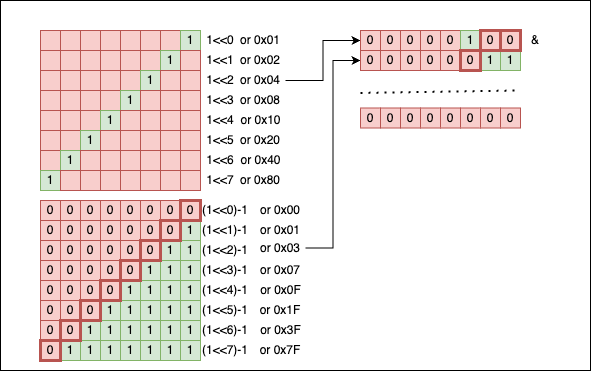
We can see that all the bits nullify themselves when we apply the & operator. If even one extra bit were different (which happens when the number is not a power of two), this trick wouldn’t work.
Getting the next power of two
There are cases in code when, given a number n, you want to determine the first power of two that is strictly greater than n (or greater than/equal to). For example, if n = 7, the next power of two is 8. Or, if n = 13, the next power of two is 16.
A programmer’s first reflex might be to write a naive function like this:
uint32_t next_power_of_two_naive(uint32_t n) {
    uint32_t r = 1u;
    while (r < n)
        r *= 2; // or r <<= 1
    return r;
}
The code works, but it’s prone to edge-case errors:
uint32_t n1 = 0u, n2 = 128u, n3 = 7u, n4 = UINT32_MAX;
printf("next power of two for %u is %u\n", n1, next_power_of_two_naive(n1));
printf("next power of two for %u is %u\n", n2, next_power_of_two_naive(n2));
printf("next power of two for %u is %u\n", n3, next_power_of_two_naive(n3));
printf("next power of two for %u is %u\n", n4, next_power_of_two_naive(n4));

// Output
// next power of two for 0 is 1
// next power of two for 128 is 128
// next power of two for 7 is 8
// ^C <--- HAD TO CLOSE THE PROGRAM, INFINITE LOOP
Let’s abandon this solution and try to make use of bitwise operations. The new code looks like this:
uint32_t next_power_of_two(uint32_t n) {
    n--;
    n |= n >> 1;
    n |= n >> 2;
    n |= n >> 4;
    n |= n >> 8;
    n |= n >> 16;
    n++;
    return n;
}
Does it work better?
uint32_t n1 = 0u, n2 = 128u, n3 = 7u, n4 = UINT32_MAX;
printf("next power of two for %u is %u\n", n1, next_power_of_two(n1));
printf("next power of two for %u is %u\n", n2, next_power_of_two(n2));
printf("next power of two for %u is %u\n", n3, next_power_of_two(n3));
printf("next power of two for %u is %u\n", n4, next_power_of_two(n4));

// Output
// next power of two for 0 is 0
// next power of two for 128 is 128
// next power of two for 7 is 8
// next power of two for 4294967295 is 0
Well, at least the code doesn’t enter an infinite loop when n = UINT32_MAX, but it returns an erroneous result for 0. So we should definitely adjust it:
uint32_t next_power_of_two(uint32_t n) {
    if (n == 0) return 1; // takes care of the special case
    n--;
    n |= n >> 1;
    n |= n >> 2;
    n |= n >> 4;
    n |= n >> 8;
    n |= n >> 16;
    n++;
    return n;
}
Now, we should also do something when the numbers are getting dangerously close to UINT32_MAX. As you probably know, UINT32_MAX is not a power of two (it’s actually (1 << 32) - 1), so searching for the next power of two after 1 << 31 doesn’t make any mathematical sense within a 32-bit boundary. If we leave the function in its current form:
uint32_t n1 = (1u << 31) + 1,
         n2 = (1u << 31) + 2,
         n3 = (1u << 31) + 3;

printf("next power of two for %u is %u\n", n1, next_power_of_two(n1));
printf("next power of two for %u is %u\n", n2, next_power_of_two(n2));
printf("next power of two for %u is %u\n", n3, next_power_of_two(n3));

// Output
// next power of two for 2147483649 is 0
// next power of two for 2147483650 is 0
// next power of two for 2147483651 is 0
All the results overflow to 0. So we should branch the function again and decide how we want to handle the error state when n > (1 << 31).
But for now, let’s get back to the bitwise magic and see what is actually happening:
n--;
n |= n >> 1;
n |= n >> 2;
n |= n >> 4;
n |= n >> 8;
n |= n >> 16;
n++;
Let’s assume n = 0x4000A8CC (or n = 1073785036). Calling next_power_of_two(0x4000A8CC) will return 0x80000000:
n         = 01000000000000001010100011001100 (0x4000A8CC)
n--       = 01000000000000001010100011001011 (0x4000A8CB)

n>>1      = 00100000000000000101010001100101
n         = 01000000000000001010100011001011
n|(n>>1)  = 01100000000000001111110011101111
            -->1s                      1s<--

n>>2      = 00011000000000000011111100111011
n         = 01100000000000001111110011101111
n|(n>>2)  = 01111000000000001111111111111111
            --->1s                    1s<---

n>>4      = 00000111100000000000111111111111
n         = 01111000000000001111111111111111
n|(n>>4)  = 01111111100000001111111111111111
            ----->1s               1s<------

n>>8      = 00000000011111111000000011111111
n         = 01111111100000001111111111111111
n|(n>>8)  = 01111111111111111111111111111111
            ------->1s           1s<--------

n>>16     = 00000000000000000111111111111111
n         = 01111111111111111111111111111111
n|(n>>16) = 01111111111111111111111111111111
            --------->1s        1s<---------

n++       = 10000000000000000000000000000000 (0x80000000)
As you can see, at each iteration, we are systematically propagating the highest 1 bit downwards, effectively creating a mask of all 1s below the highest set bit (in the form (1 << k) - 1). By the end, when adding 1, it cascades all the way to the top and we get the next pure power of two: 1 << k.
Implementing a BitSet (or BitVector)
The terms BitSet and BitVector are often used interchangeably to refer to a data structure representing a collection of bits, each of which can be 0 or 1. A BitSet is like a massive panel of ON/OFF switches. You can easily alter the state of those ON/OFF switches as long as you know their specific position (index) in the set.
However, there can be some subtle differences in the implementation and usage of the two terms based on the context in which they are being used. Sometimes, a
BitSetmay refer to a fixed-size collection of bits, whileBitVectormay refer to a dynamically resizable collection of bits.
For simplicity, we will implement a fixed-size BitSet using—you guessed it—bitwise operations. The minimal set of operations a BitSet should support are:
- Setting a bit to
0(clearing a bit, already covered here); - Setting a bit to
1(setting a bit, already covered here); - Retrieving the value of a bit (already covered here);
- Resetting the
BitSet(setting all the bits back to0).
Now that we know how to manipulate the individual bits of an integer, we can establish that:
- A
uint16_tcan be considered aBitSetwith a capacity of16bits; - A
uint32_tcan be considered aBitSetwith a capacity of32bits; - A
uint64_tcan be considered aBitSetwith a capacity of64bits.
But what if we want a BitSet with a capacity larger than 64 bits? We don’t have a standard uint128_t (yet!). So, we will probably have to use an array of 4 uint32_t integers or 2 uint64_t integers. Ultimately, a BitSet is simply an array of fixed-size numbers (uintN_t), where we index individual bits by their continuous relative position across the entire array.
The following diagram describes an array of four uint32_t integers providing a total of 4 * 32 = 128 ON/OFF switches (bits 0 or 1). Each bit should be accessible relative to its overall position in the array, rather than its local position within an individual integer (word):
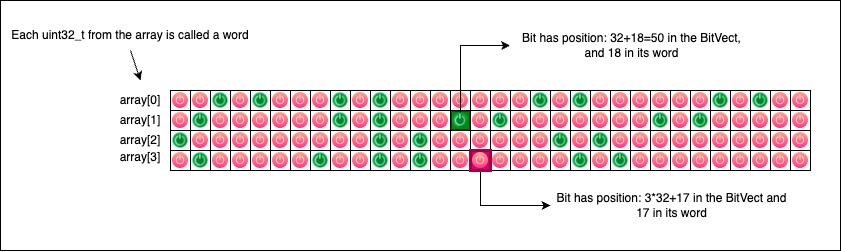
To implement our BitSet, we will use C macros:
#define SET_NW(n) (((n) + 31) >> 5)
#define SET_W(index) ((index) >> 5)
#define SET_MASK(index) (1U << ((index) & 31))

#define SET_DECLARE(name, size) uint32_t name[SET_NW(size)] = {0}
#define SET_1(name, index) (name[SET_W(index)] |= SET_MASK(index))
#define SET_0(name, index) (name[SET_W(index)] &= ~SET_MASK(index))
#define SET_GET(name, index) (name[SET_W(index)] & SET_MASK(index))
Things can look daunting at first glance, so let’s take each line and explain exactly what it does.
SET_NW
#define SET_NW(n) (((n) + 31) >> 5)
This macro determines the total number of uint32_t words we need to allocate to represent a BitSet of a given bit size.
If, for example, we need 47 bit positions, then SET_NW(47) will return (47 + 31) >> 5, which is mathematically equivalent to calculating (47 + 31) / 32 = 2 (integer division). This tells us our array needs at least two uint32_t integers to hold 47 bits safely.
SET_W
#define SET_W(index) ((index) >> 5)
This macro returns the array index of the specific uint32_t word that contains the bit we are looking for.
For example, if our BitSet has 64 bits (spanning two uint32_t words), calling SET_W(35) will return 35 >> 5, which is equivalent to 35 / 32 = 1. This correctly indicates that we must look for bit 35 inside the second uint32_t of the array (at index 1).
SET_MASK
#define SET_MASK(index) (1U << ((index) & 31))
Based on a given global bit index, this macro generates the local mask required to select that individual bit from its specific uint32_t word. The operation index & 31 is a highly optimized bitwise equivalent of saying index % 32.
So, if we call SET_MASK(16), it computes 16 & 31 = 16 and creates a mask (1U << 16) that targets the 16th local bit of the word. If we call SET_MASK(35), it computes 35 & 31 = 3 and creates a mask (1U << 3) that correctly targets the 3rd local bit in the corresponding word.
To summarize: SET_MASK works at the local word level, while SET_W works at the global array level.
SET_DECLARE
#define SET_DECLARE(name, size) uint32_t name[SET_NW(size)] = {0};
This macro elegantly declares a bitset array (uint32_t[]) with the given name and size, immediately initializing it to all zeros. After declaration, the BitSet is in a completely clean state; no ON/OFF switch is activated.
SET_1 and SET_0
#define SET_1(name, index) (name[SET_W(index)] |= SET_MASK(index))
#define SET_0(name, index) (name[SET_W(index)] &= ~SET_MASK(index))
These macros are used to perfectly SET to 0 or 1 specific bits inside the array. The underlying bitwise techniques for doing this were already described here. Notice how they seamlessly combine the word selector (SET_W) and the local bit mask (SET_MASK).
SET_GET
#define SET_GET(name, index) (name[SET_W(index)] & SET_MASK(index))
This macro is used to check whether a bit is currently set. If the bit is set to 1, the macro returns a non-zero value (specifically, the value of the mask). If the bit is set to 0, the macro returns 0.
Using the BitSet
To test our newly defined macro-based BitSet, we can use the following code:
// Declares uint32_t bitset[3] = {0};
SET_DECLARE(bitset, 84);

// Sets the bits at index 1 and index 80 to 1
SET_1(bitset, 1);
SET_1(bitset, 80);

printf("Is bit %d set? Answer: %s.\n", 1, SET_GET(bitset, 1) ? "YES" : "NO");
printf("Is bit %d set? Answer: %s.\n", 2, SET_GET(bitset, 2) ? "YES" : "NO");
printf("Is bit %d set? Answer: %s.\n", 80, SET_GET(bitset, 80) ? "YES" : "NO");

// Output
// Is bit 1 set? Answer: YES.
// Is bit 2 set? Answer: NO.
// Is bit 80 set? Answer: YES.
Swapping two numbers
This bitwise trick is usually unnecessary in modern codebases, but it’s a fun one to pull out when you want to baffle your colleagues.
Swapping the values of two variables is normally done using an intermediary variable. This is one of the very first “algorithms” we learn when we start programming:
void swap(int *a, int *b) {
    int tmp = *a;
    *a = *b;
    *b = tmp;
}

int main(void) {
    int a = 5, b = 7;
    printf("Before swap: a=%d b=%d\n", a, b);
    swap(&a, &b);
    printf("After swap: a=%d b=%d\n", a, b);
    return 0;
}
But there is another clever way to achieve the exact same result without the need to introduce a new tmp variable:
void swap_xor(uint8_t *a, uint8_t *b) {
    *a ^= *b;
    *b ^= *a;
    *a ^= *b;
}

int main(void) {
    uint8_t a = 7u;
    uint8_t b = 13u;
    printf("Before swap: a=%hhu b=%hhu\n", a, b);
    swap_xor(&a, &b);
    printf("After swap: a=%hhu b=%hhu\n", a, b);
    return 0;
}

// Output
// Before swap: a=7 b=13
// After swap: a=13 b=7
What kind of magic is this? Let’s break down those three lines of code. To make it easier to follow, let’s assume the initial starting value of *a is $A$, and the initial starting value of *b is $B$.
Because the ^ (XOR) operation is both associative and commutative, and because any number XORed with itself is 0 ($X \oplus X = 0$), the mystery unfolds like this:
- First line (
*a ^= *b;): The new value of*abecomes $(A \oplus B)$. The value of*bis still $B$. - Second line (
*b ^= *a;): We assign a new value to*bby XORing its current value ($B$) with the current value of*a(which is now $A \oplus B$). So,*bbecomes $B \oplus (A \oplus B)$. Because of commutativity, this is the same as $A \oplus (B \oplus B)$, which reduces to $A \oplus 0$, which is just $A$. Wow, didbjust become $A$? Yes, it did! - Third line (
*a ^= *b;): Now we assign a final value to*aby XORing its current value ($(A \oplus B)$) with the new value of*b(which is now $A$). So,*abecomes $(A \oplus B) \oplus A$. This rearranges to $B \oplus (A \oplus A)$, which reduces to $B \oplus 0$, which is $B$. Wow, didajust become $B$?
It looks complicated at first glance, but if you put it on paper and follow the properties of XOR, the magic is just simple math.
Bitwise operations and chars
Characters in C (char) are represented by numerical values, famously mapped out by the ASCII standard (you can find a wonderful mapping here):
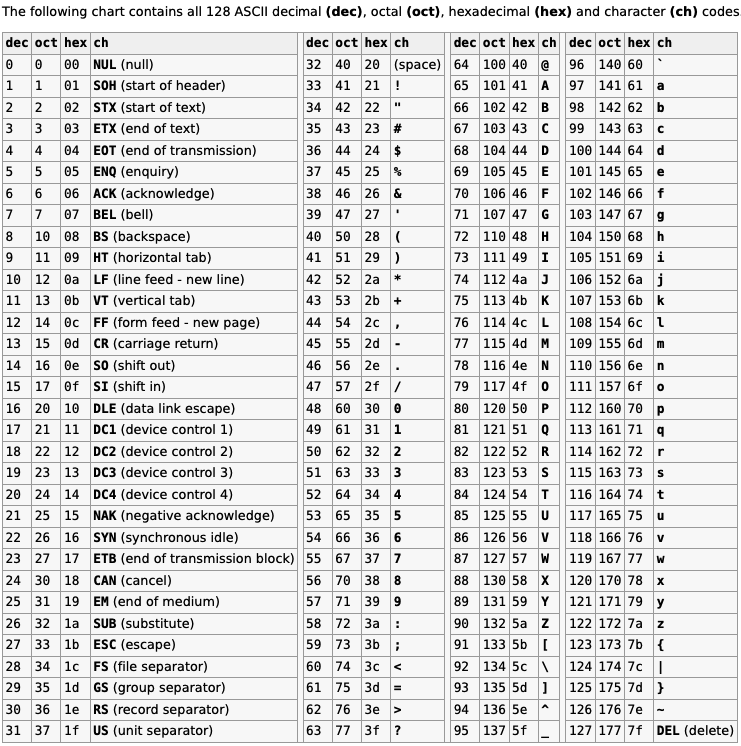
Without diving too deeply into the complicated realm of character encoding, we can confidently say that your average char in C is simply a number. All the standard printable char symbols are found in the decimal interval [32..126].
The uppercase letters are located inside the interval [65..90], while the lowercase letters are found inside the interval [97..122]. Because chars are just numbers under the hood, we can easily use bitwise operations on them.
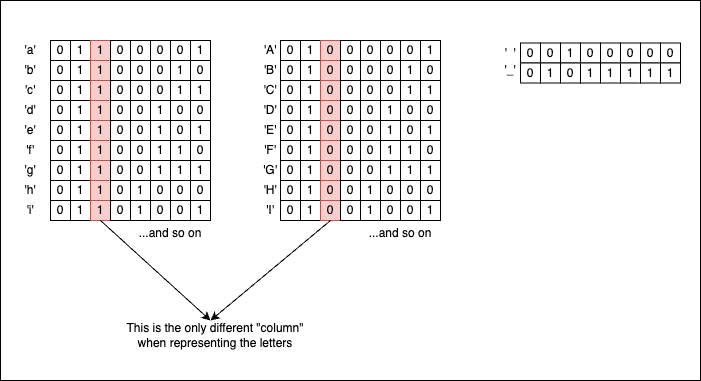
If you look closely at their binary representations, uppercase and lowercase letters have identical bit patterns, except for the column corresponding to the 1 << 5 bit (which has a decimal value of 32). So, with the right masks in place, we can transition back and forth from lowercase to uppercase format. But what is the right mask? Well, it just so happens that the decimal value 32 corresponds to 0x20, which is exactly the ASCII code for the ' ' (space) character!
So if we take an uppercase letter and apply a bitwise OR with a space (| ' '), we will obtain its lowercase equivalent because we forcefully activate the 1 << 5 bit:
char *p = "ABCDEFGH";
while(*p) {
    printf("%c", *p | ' ');
    p++;
}

// Output
// abcdefgh
If, on the contrary, we take a lowercase letter and apply a bitwise AND with an underscore (& '_', which corresponds to ASCII 95 or 0b01011111), we effectively “eliminate” the 1 << 5 bit and transform the initial letter into its uppercase form:
char *p = "abcdefgh";
while(*p){
    printf("%c", *p & '_');
    p++;
}

// Output
// ABCDEFGH
If we want to toggle the case entirely, we use the bitwise XOR with a space (^ ' '):
char *p = "aBcDeFgH";
while(*p) {
    printf("%c", *p ^ ' ');
    p++;
}

// Output
// AbCdEfGh
Other bitwise tricks involving chars that you might find interesting are:
// Getting the lowercase letter's position in the alphabet
for(char i = 'a'; i <= 'z'; i++) {
    printf("%c --> %d\n", i, (i ^ '`'));
}

// Output
// a --> 1
// b --> 2
// c --> 3
// d --> 4
// e --> 5
// f --> 6
// g --> 7
// ... and so on
// Getting the uppercase letter's position in the alphabet
for(char i = 'A'; i <= 'Z'; i++) {
    printf("%c --> %d\n", i, (i & '?'));
}

// Output
// A --> 1
// B --> 2
// C --> 3
// D --> 4
// E --> 5
// F --> 6
// G --> 7
// ... and so on
Around the web
This article has been discussed on:
References
Source Code & Contributions
Spot an error or have an improvement? Open a PR directly for this article .