Writing a Universal Chess Interface (UCI) Client in Java
Introduction
I love chess; it’s just that chess doesn’t love me back.
Recently my interest in chess surged (I blame Corona), so I decided to write a set of tools for creating statistics about my games—I am a programmer, after all.
My plan was to build something straightforward, you know, the type of statistics that would answer simple questions like:
- Which opening I am the most successful with;
- How good I am compared to my opponent after (let’s say) move 10;
- How often do I blunder pieces in blitz;
- etc.
So my first reaction (as a programmer) was to find a Java library that “connects” to Stockfish (or to a similar open-source chess engine) and does the work for me. Little did I know: no maintained Java library does that.
After doing my research, I found out that most modern chess engines implement a protocol called UCI. UCI stands for Universal Chess Interface. It’s good that we have a standard, right?
Well, wrong. UCI is quite arcane by today’s standards. There’s no REST API waiting to be consumed. You aren’t even connecting through a Network Socket. No! UCI uses OLD-SCHOOL process communication through stdin and stdout. And here the fun begins.
Technically there is documentation (protocol specification can be found here or here), but it’s not the type of documentation that holds you by the hand. It can’t really be used without a little “reverse engineering” and “do it yourself” testing.
This article explains how you can write your own UCI Client in Java, but the same knowledge applies to any other programming language.
The full code is on GitHub: neat-chess.
Working with an UCI-enabled engine from the command line
Installing Stockfish (and Leela Zero)
The first step was to install Stockfish as a command-line utility. If you are on *NIX, most package managers have it in their repo.
For example, on MAC:
brew install stockfish
On Ubuntu:
sudo apt-get install stockfish
On Windows:
Why are you using Windows for programming?
After installation, to start Stockfish, just type stockfish in your terminal.
Another exciting engine to work with is Leela Chess Zero. You can install this as well from the command line: brew install lc0.
Listing supported options
As per protocol definition, the first command you need to submit is uci. After the engine receives uci on its stdin, it will initialize the UCI interface and identify itself with a line starting with id name.
Then, all the supported options the engine implements are listed on lines starting with option name <option_name> type ....
After successful initialization, the engine will always print: uciok.
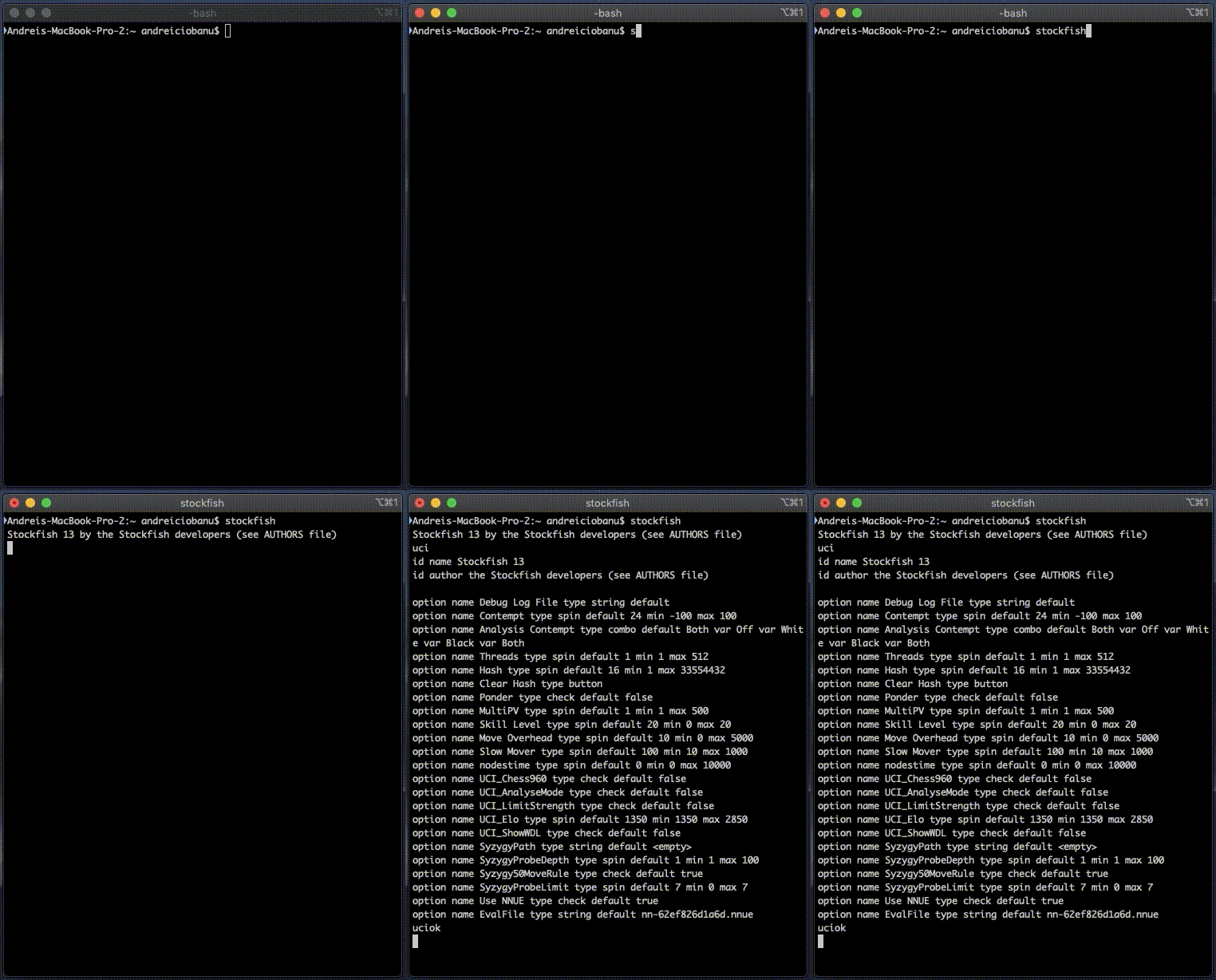
Make no assumption, the list of supported options is not standard. For example, Leela Chess Zero output is different:
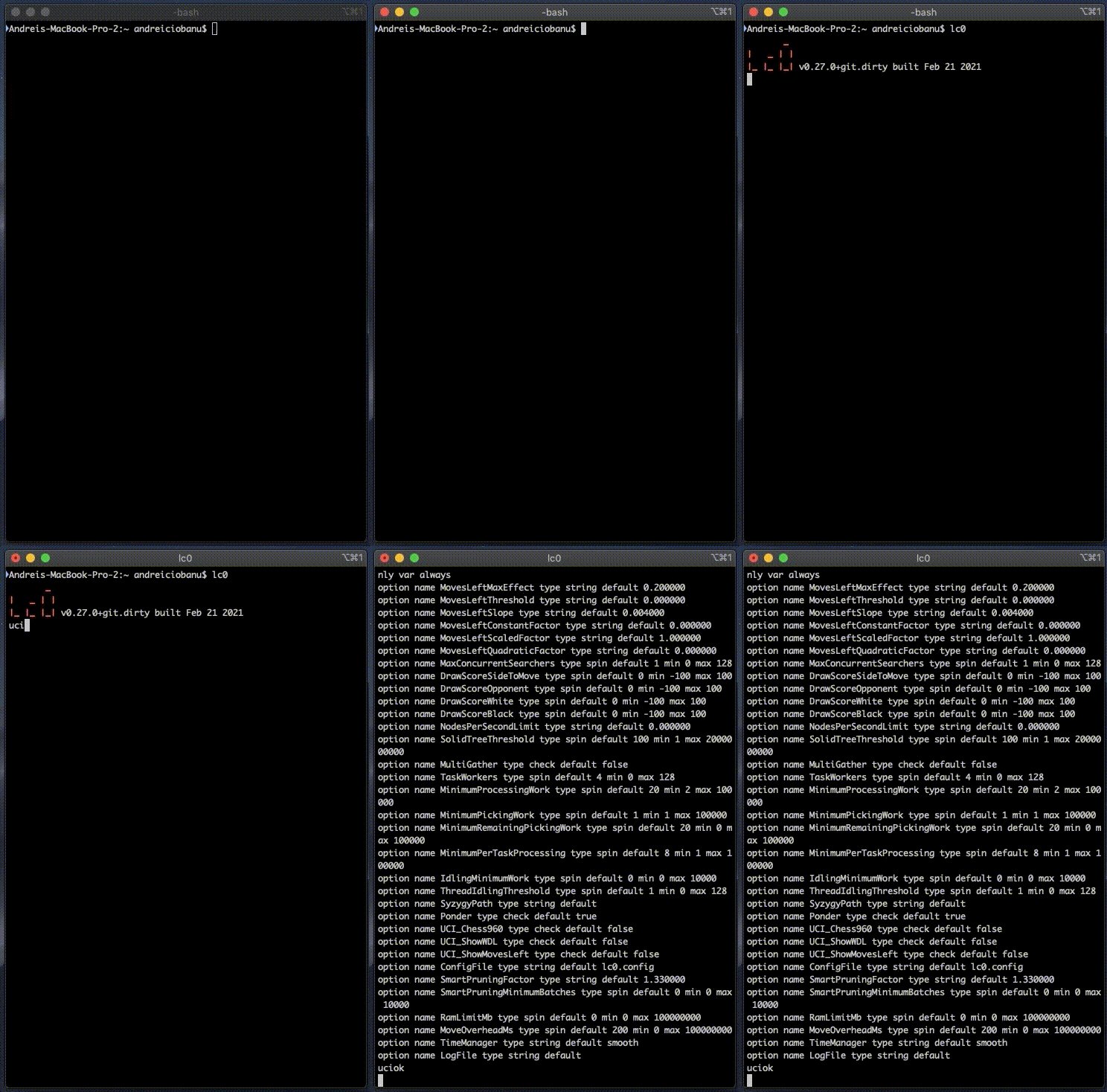
Each option has a type: check, spin, combo, button, and string. It’s essential to notice this, especially when you want to parse or set them.
| Option type | Description | Example line |
|---|---|---|
check | The option can be true or false | option name Ponder type check default false |
spin | A number in a given range [min, max] | option name MultiPV type spin default 1 min 1 max 500 |
combo | Predefined string values | option name Analysis Contempt type combo default Both var Off var White var Black var Both |
button | No value; used to signal an action | option name Clear Hash type button |
string | A simple text string | option name EvalFile type string default nn-62ef826d1a6d.nnue |
Now, in the original specification, the following options are listed, but engines aren’t limited to these.
| Option name | Description |
|---|---|
Hash | Memory in MB for internal hash tables. |
NalimovPath | Path to Nalimov table bases. |
NalimovCache | Internal cache for Nalimov table bases. |
Ponder | Toggles whether the engine can ponder (think on opponent’s time). |
OwnBook | Toggles whether the engine uses its own opening book. |
MultiPV | Number of best lines to show (k-best mode). |
UCI_ShowCurrLine | Toggles showing the current line being calculated. |
UCI_ShowRefutations | Toggles showing moves and their refutations. |
UCI_LimitStrength | Toggles limiting strength to a specific Elo. |
UCI_Elo | Specifies the Elo value for strength limiting. |
UCI_AnalyseMode | Toggles engine behavior for analysis vs playing mode. |
UCI_Opponent | Sends opponent info (name, title, Elo) to the engine. |
Changing an option
To change the value of an existing option, use:
setoption name <option_name> value <value>
For example, if we want the engine to enter Analyse Mode (UCI_AnalyseMode) and support five analysis lines (MultiPV), we write:
setoption name UCI_AnalyseMode value true
setoption name MultiPV value 5
As a best practice, after sending a synchronous command, it’s best to issue: isready.
isready > This must be sent when the engine has processed all input and is ready to accept new commands. It is usually sent after a command that can take some time, but it can be used anytime and must always be answered with “readyok”.
So the current order of commands should be:
setoption name UCI_AnalyseMode value true
setoption name MultiPV value 5
isready
Real-time example: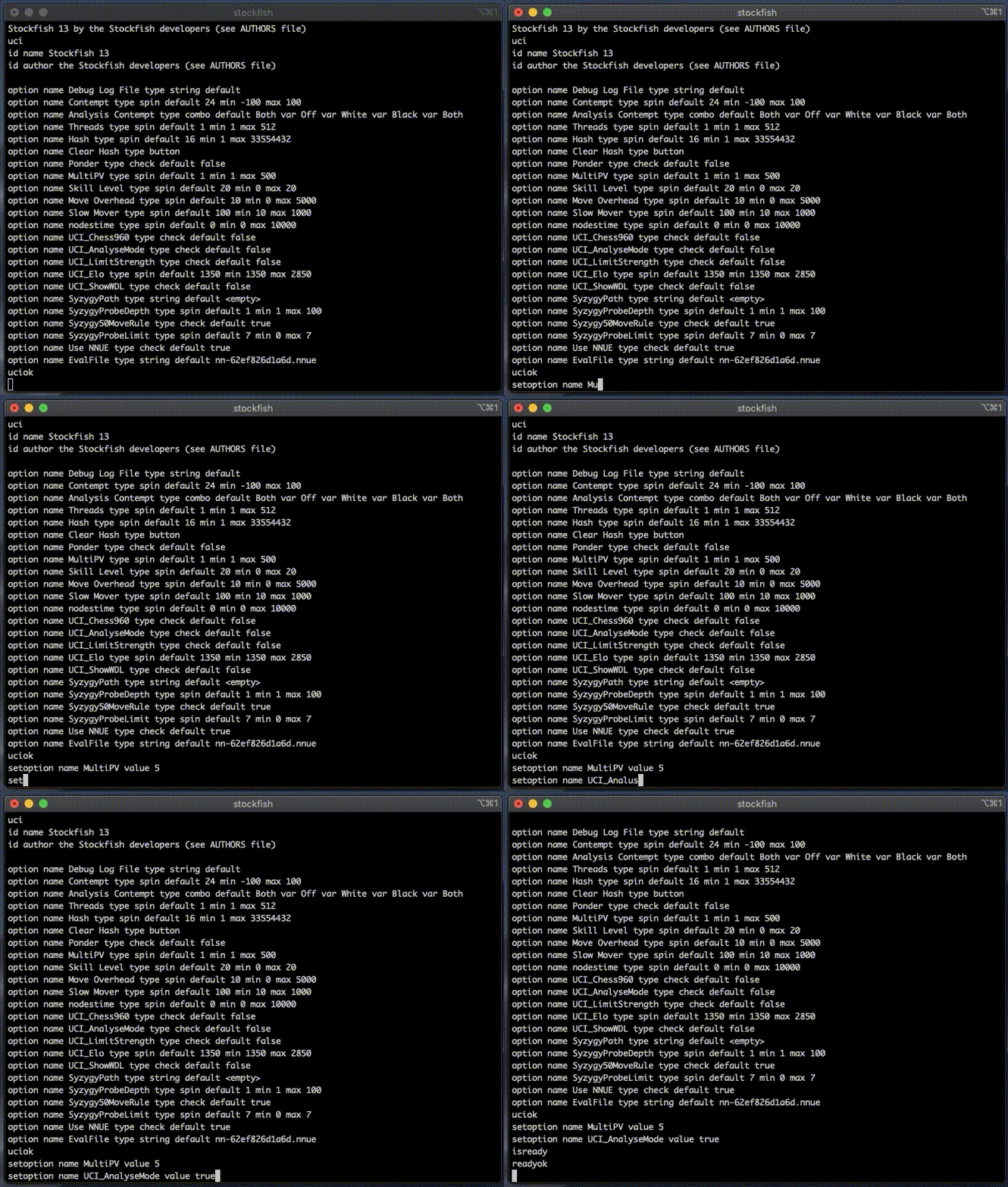
Analyzing a position
A UCI-enabled chess engine uses FEN (Forsyth–Edwards Notation) to read a given position. FEN contains a “snapshot” of the chessboard at a given moment.
On the other hand, PGN (Portable Game Notation) contains the whole game history. UCI engines understand FEN, not PGN.
Before analyzing a position, use ucinewgame to clear the engine state. Since ucinewgame can take longer than expected, it’s best to follow it with an isready command.
To set a new position:
position fen <FEN>
Example position (mate in 3, Black to move):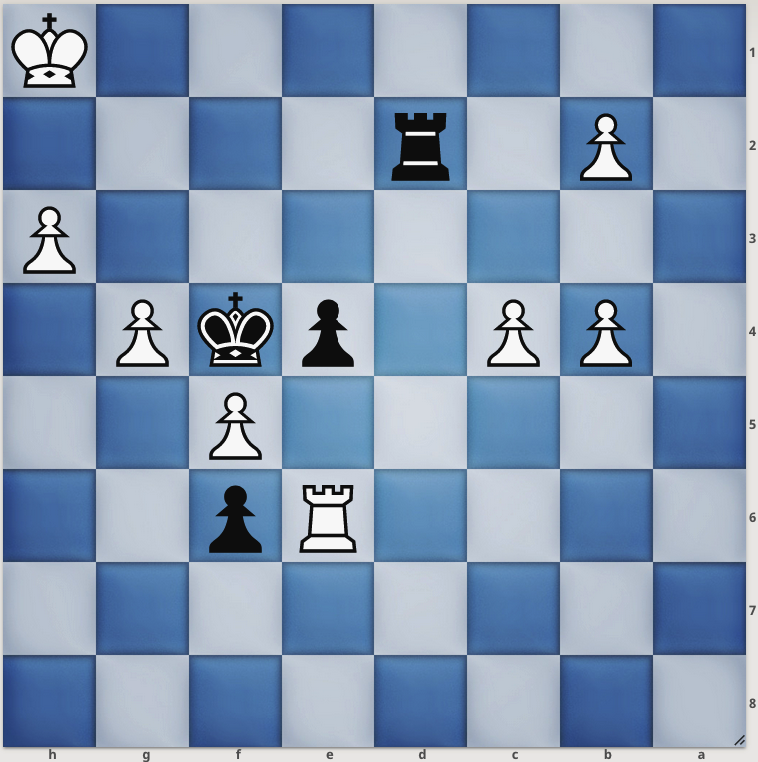
The corresponding FEN: 8/8/4Rp2/5P2/1PP1pkP1/7P/1P1r4/7K b - - 0 40.
ucinewgame
isready
position fen 8/8/4Rp2/5P2/1PP1pkP1/7P/1P1r4/7K b - - 0 40
Now ask the engine to analyze using go <params>:
go movetime 1000
This forces the engine to think for only 1 second.
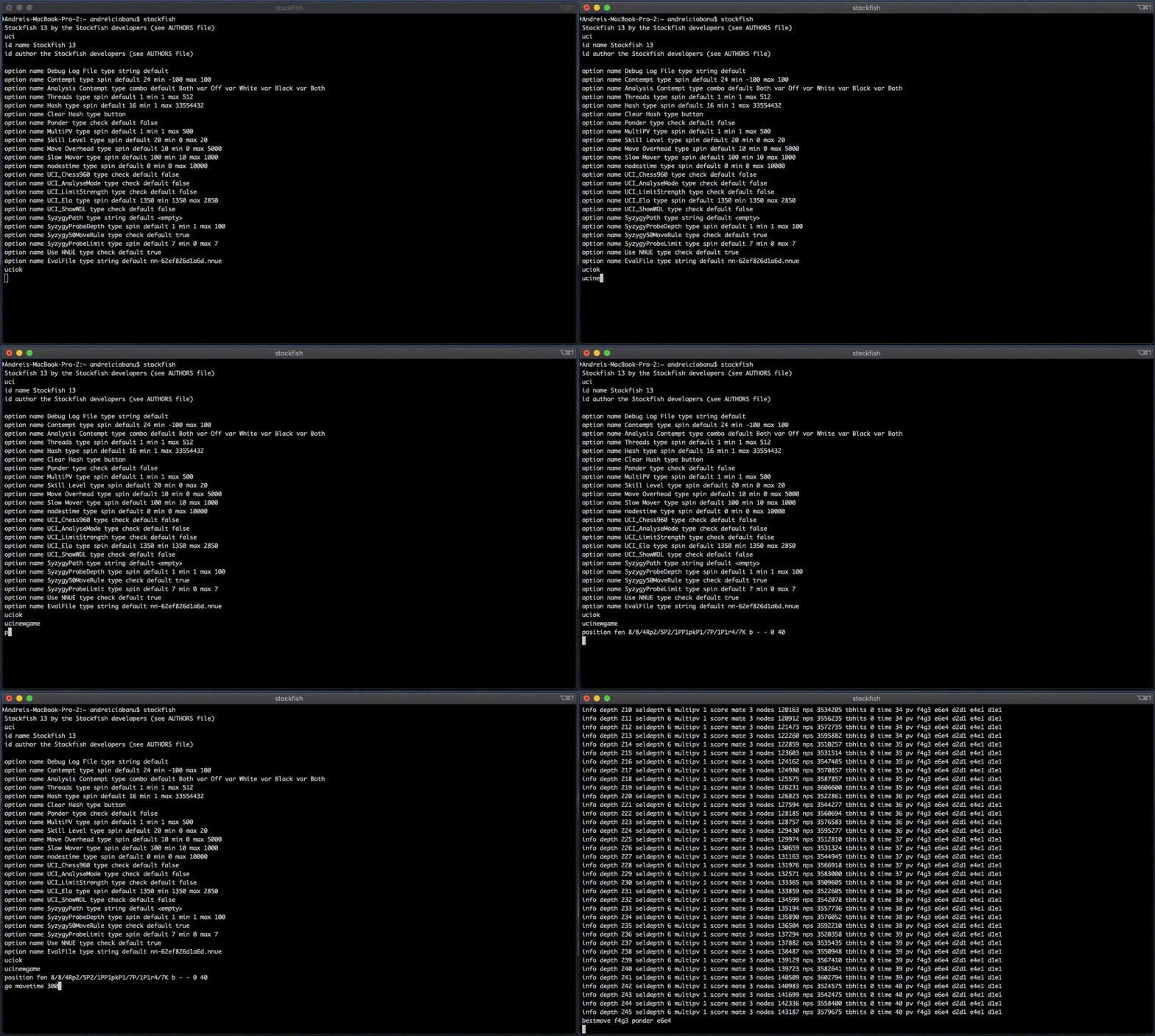
The last two lines of output show:
info depth 245 seldepth 6 multipv 1 score mate 3 nodes 143187 nps 3579675 tbhits 0 time 40 pv f4g3 e6e4 d2d1 e4e1 d1e1
bestmove f4g3 ponder e6e4
Stockfish suggests f4g3 (Black King) and correctly identifies a mate in 3. UCI uses from-move-to-move notation (LAN), so you often need a chessboard in parallel to visualize it.
Writing the Java UCI Client library
A UCI engine works like this:
- Open the chess engine process;
- Write commands to
stdin; - Read results from
stdout; - You can’t precisely estimate analysis time;
- A process only handles one position at a time. For parallel analysis, open multiple processes.
Opening and closing the engine process
We use Process and ProcessBuilder:
public class Client {
    private Process process = null;
    private BufferedReader reader = null;
    private OutputStreamWriter writer = null;

    public void start(String cmd) {
        var pb = new ProcessBuilder(cmd);
        try {
            this.process = pb.start();
            this.reader = new BufferedReader(new InputStreamReader(process.getInputStream()));
            this.writer = new OutputStreamWriter(process.getOutputStream());
        } catch (IOException e) {
            e.printStackTrace();
        }
    }

    public void close() {
        if (this.process != null && this.process.isAlive()) {
            this.process.destroy();
        }
        try {
            if (reader != null) reader.close();
            if (writer != null) writer.close();
        } catch (IOException e) {
            e.printStackTrace();
        }
    }
}
Sending commands to the engine
Designing a robust command method requires a few things:
- Timeout: We need a limit because analysis can take forever. We wrap execution in a
CompletableFutureand useget(timeout). - Blocking: The thread should wait for the response to avoid sending commands in parallel.
- Genericity: Use a higher-order function to process lines.
public <T> T command(String cmd, Function<List<String>, T> processor, Predicate<String> breakCondition, long timeout)
        throws InterruptedException, ExecutionException, TimeoutException {

    CompletableFuture<T> future = CompletableFuture.supplyAsync(() -> {
        List<String> output = new ArrayList<>();
        try {
            writer.write(cmd + "\n");
            writer.write("isready\n");
            writer.flush();
            String line;
            while ((line = reader.readLine()) != null) {
                if (line.contains("Unknown command")) throw new RuntimeException(line);
                output.add(line);
                if (breakCondition.test(line)) break;
            }
        } catch (IOException e) {
            e.printStackTrace();
        }
        return processor.apply(output);
    });

    return future.get(timeout, TimeUnit.MILLISECONDS);
}
Example: Getting the best move
Let’s ask Stockfish for the best move in our mate-in-3 position:
var client = new Client();
var position = "8/8/4Rp2/5P2/1PP1pkP1/7P/1P1r4/7K b - - 0 40";
client.start("stockfish");

// Init
client.command("uci", identity(), s -> s.startsWith("uciok"), 2000L);
// Set position
client.command("position fen " + position, identity(), s -> s.startsWith("readyok"), 2000L);

// Go
String bestMove = client.command(
        "go movetime 3000",
        lines -> lines.stream().filter(s -> s.startsWith("bestmove")).findFirst().get(),
        line -> line.startsWith("bestmove"),
        5000L)
        .split(" ")[1];

System.out.println(bestMove); // Output: f4g3
client.close();
Example: Retrieving the 10 best moves
This involves parsing the engine’s info lines. First, set MultiPV to 10.
client.command("setoption name MultiPV value 10", identity(), s -> s.startsWith("readyok"), 2000L);
For the Ruy-Lopez position (r1bqkbnr/pppp1ppp/2n5/1B2p3/4P3/5N2/PPPP1PPP/RNBQK2R b KQkq - 3 3), the engine output looks like this:
info depth 10 seldepth 12 multipv 1 score cp -8 ... pv a7a6 b5a4 g8f6 ...
info depth 10 seldepth 13 multipv 2 score cp -27 ... pv g8f6 b1c3 f8d6 ...
The relevant part is:
info depth <depth> ... multipv <line> score cp <score> ... pv <move1> <move2> ...
We can use a regex with groups to capture this:
info depth ([\w]*) seldepth [\w]* multipv ([\w]*) score (cp ([\-\w]*)|mate ([\w*])) [\s\w]*pv ([\w]*)\s*([\s\w]*)
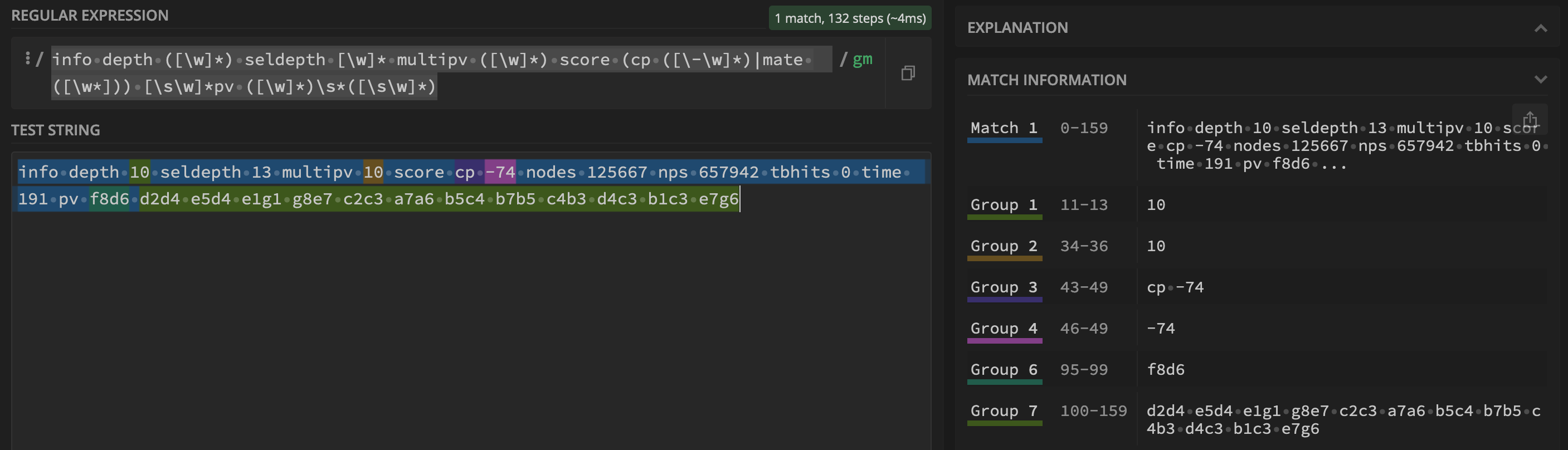
group 1: depthgroup 2: line number (multipv)group 4: score (centipawns)group 5: mate in Xgroup 6: actual move
var analysisLineRegex = "info depth ([\\w]*) seldepth [\\w]* multipv ([\\w]*) score (cp ([\\-\\w]*)|mate ([\\w*])) [\\s\\w]*pv ([\\w]*)\\s*([\\s\\w]*)";
var pattern = Pattern.compile(analysisLineRegex);

Map<Integer, String> bestMoves = client.command(
    "go depth 10",
    lines -> {
        Map<Integer, String> result = new TreeMap<>();
        for(String line : lines) {
            var matcher = pattern.matcher(line);
            if (matcher.matches()) {
                result.put(Integer.parseInt(matcher.group(2)), matcher.group(6));
            }
        }
        return result;
    },
    s -> s.startsWith("bestmove"),
    5000L);

bestMoves.forEach((k, v) -> System.out.println(k + " " + v));
Going further
The code above is a bit raw, but it’s a foundation. Normally, you’d hide the generic command() method and expose high-level abstractions.
This is what I did with neat-chess. It’s a library tested with Stockfish 13 that handles the “nasty” parts for you.
Using neat-chess, the code looks much cleaner:
var client = new UCI();
client.startStockfish();
client.setOption("MultiPV", "10");
client.positionFen("r1bqkbnr/pppp1ppp/2n5/1B2p3/4P3/5N2/PPPP1PPP/RNBQK2R b KQkq - 3 3");
var analysis = client.analysis(18).getResultOrThrow();

analysis.getAllMoves().forEach((idx, move) -> {
    System.out.println(move);
});
client.close();
References
Source Code & Contributions
Spot an error or have an improvement? Open a PR directly for this article .